
The game's UI provides vital information about your character's status and available resources. Keeping an eye on these elements is crucial for survival.
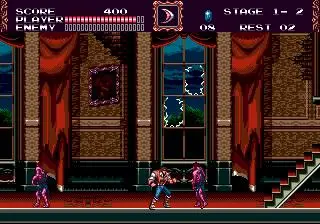
- Top-Left Corner: Your character's current health bar. When it depletes, you lose a life.
- Below Health Bar: Your current score. Accumulating points can grant extra lives.
- Top-Right Corner: Number of lives remaining. Losing all lives results in a Game Over.
- Below Lives: Your current heart count. Hearts are consumed when using sub-weapons.
- Next to Hearts: Your currently equipped sub-weapon icon.
- Bottom-Left Corner: Stage timer (if applicable). Running out of time results in a lost life.
- Bottom-Right Corner: Current stage number.
Pay close attention to your health and heart count. Hearts are a valuable resource, so use your sub-weapons strategically. Collecting heart items will replenish your supply, while meat items restore health. Understanding the UI at a glance will allow you to make quick decisions in the heat of battle.