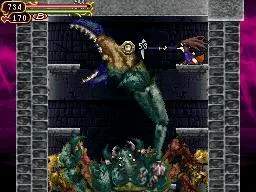
The UI provides vital information during gameplay. Familiarize yourself with its elements to make informed decisions in combat and exploration.
Top Screen:
- HP Bar: Your current health. Depletes when you take damage.
- MP Bar: Your current magic points. Used for Glyph attacks and Sub-Weapons. Regenerates over time.
- Hearts: Used for Sub-Weapon Glyphs.
- Equipped Glyphs: Displays your currently assigned Attack (L/R) and Sub-Weapon (X) Glyphs.
- Experience Bar: Shows your progress to the next level.
- Gold: Your current money.
Bottom Screen:
- Map: Displays the current area, explored sections, and points of interest.
- Glyph Management: Allows you to assign Glyphs to your L, R, and X slots.
- Status: Shows Shanoa's current stats and equipment.
Regularly check your map to avoid getting lost and your Glyph management screen to optimize your loadout for different enemy types and boss encounters. The MP bar is particularly important, as many powerful Glyphs consume a significant amount of magic.