The Castlevania UI is minimalistic but provides all the crucial information you need to survive. Understanding each element at a glance will help you make informed decisions during intense combat and exploration. Pay close attention to your health, heart count, and current sub-weapon, as these are your primary resources for overcoming Dracula's forces. The score is primarily for bragging rights, but a high score often indicates efficient play.
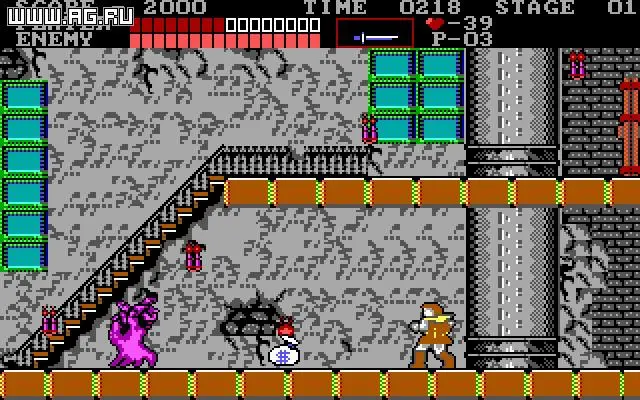
| UI Element | Description |
|---|---|
| Simon's Health Bar: | Located at the top left of the screen. Depletes when Simon takes damage. If it reaches zero, Simon loses a life. |
| Enemy Health Bar: | Appears at the top right when fighting a boss. Shows the boss's remaining health. |
| Hearts: | Displayed below Simon's health. These are not health points but ammunition for your sub-weapons. Each sub-weapon use consumes a certain number of hearts. |
| Current Sub-Weapon: | An icon next to your heart count indicates which sub-weapon you currently possess. |
| Score: | Located at the top center. Increases by defeating enemies and collecting items. |
| Stage Number: | Indicates the current stage you are in. |
| Lives: | Shows how many lives Simon has remaining. Losing all lives results in a Game Over. |
Keep an eye on your heart count, as running out can leave you vulnerable in critical situations. Prioritize collecting hearts when you're low, especially before boss encounters.