Game Screens
Dwarf Fortress presents a complex and information-rich interface through a series of distinct game screens. Each screen serves a specific purpose, from managing your dwarves' labor to desing your fortress layout and observing the world map. Familiarizing yourself with these screens is key to effective gameplay.
The game doesn't rely on traditional graphical menus for all its functions. Instead, it utilizes a combination of text-based displays, symbol-driven interfaces, and context-sensitive menus. Understanding how to navigate between these screens and interpret the information presented is fundamental to mastering the game.
Here are some of the primary game screens you'll encounter:
- Main Game Screen: This is where you'll spend most of your time, viewing your fortress, issuing commands, and observing your dwarves. It displays terrain, units, and various status indicators.
- Options Menu: Accessed by pressing `Esc`, this screen provides access to saving, quitting, game settings, and other essential system functions.
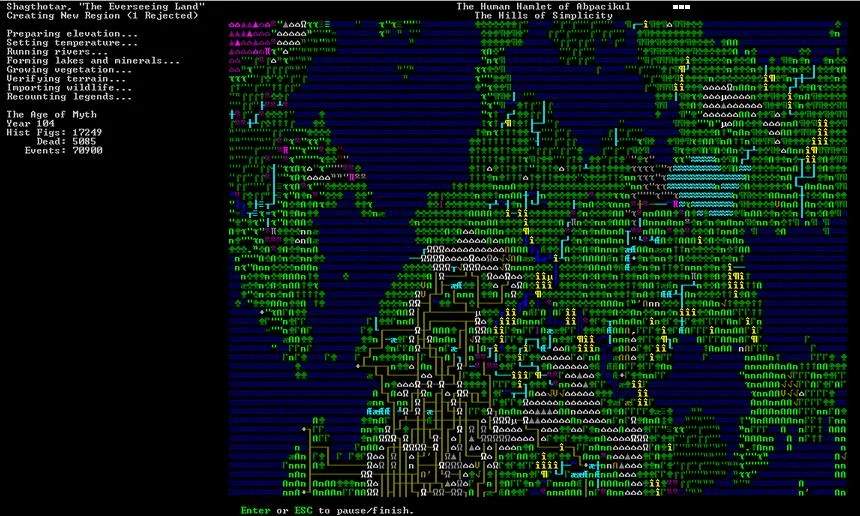
- World Map: Used during embark and for strategic overview, this screen displays the continents, biomes, civilizations, and sites of your generated world.
- Unit Screen: This screen provides detailed information about individual dwarves and creatures, including their skills, needs, health, and equipment.
- Stocks Screen: Shows all the items currently stored in your fortress, organized by type and location.
- Labor Management Screen: Allows you to ass specific jobs and tasks to your dwarves, controlling who does what within the fortress.
- Building Menu: Used to desate the construction of various structures, from workshops and bedrooms to fortifications and traps.
- Desations Menu: Enables you to mark areas for mining, digging, chopping trees, and other terrain-altering tasks.
Each of these screens is navigated using keyboard shortcuts and mouse clicks. The game often uses context-sensitive menus, meaning the available options change depending on what you are currently viewing or interacting with. For example, right-clicking on a dwarf might bring up a menu specific to that dwarf's actions or status.
While the initial learning curve for the interface can be steep, the game provides extensive in-game help and tutorials. Dedicating time to understanding these screens will sificantly improve your ability to manage your fortress and overcome the challenges that await.