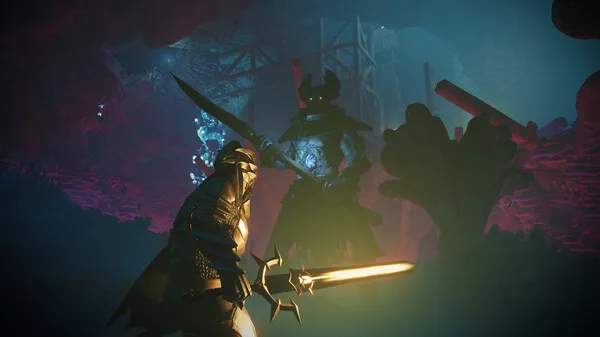
Multiplayer & Co-op Guide
Enshrouded offers a rich co-operative experience, allowing up to 16 players to explore the vast, perilous world of Embervale together. Whether you're building grand bases, delving into treacherous Shroud-filled dungeons, or facing formidable bosses, playing with friends significantly enhances the adventure. This guide will walk you through everything you need to know to set up, manage, and thrive in multiplayer.
Getting Started: Joining & Hosting Sessions
Enshrouded supports both dedicated servers and player-hosted sessions, offering flexibility for different playstyles.
Joining a Friend's Game
- Launch Enshrouded: Start the game from your Steam library.
- Main Menu: From the main menu, select "Play".
- Choose Character: Select the character you wish to play with.
- Join: Click on the "Join" button.
- Friend's Servers: The game will display a list of available servers hosted by your Steam friends. Select the desired server.
- Connect: Click "Join" again to connect to their session.
Note: Ensure your friend has their game set to "Public" or "Friends Only" for you to see their server. If they are hosting a private server with a password, they will need to provide it to you.
Hosting Your Own Game
Hosting allows you to be the session leader, controlling the world's progression and settings.
- Launch Enshrouded: Start the game.
- Main Menu: Select "Play".
- Choose Character: Select your character.
- Host: Click on the "Host" button.
- Server Settings:
- Server Name: Give your server a recognizable name.
- Password (Optional): Set a password if you want to restrict access to specific players. Leave blank for open access.
- Max Players: Adjust the maximum number of players (up to 16).
- Privacy: Choose between "Public" (anyone can join), "Friends Only" (only Steam friends can join), or "Private" (password required).
- Start Server: Click "Host" to launch your world. Your friends can now find your server under the "Friend's Servers" tab.
Important Considerations for Hosting:
- Host's PC Performance: The host's computer handles the server's processing. A stable internet connection and a capable PC are crucial for a smooth experience for all players.
- World Progression: The host's world progression (quests, unlocked areas, base building) is what all players will experience.
- Saving: The world state is saved on the host's machine. Ensure the host saves regularly and exits the game properly to avoid losing progress.
Dedicated Servers
For a more persistent and stable multiplayer experience, especially with a larger group or if the host doesn't want to be tied to the game session, dedicated servers are ideal. These run independently of any player's game client.
- Availability: Dedicated servers can be rented from third-party providers or set up on your own hardware.
- Benefits:
- 24/7 Uptime: The server runs continuously, allowing players to join anytime.
- Improved Performance: Often hosted on powerful machines with dedicated resources.
- No Host Dependency: The world persists even if the host is offline.
- Setup: Setting up a dedicated server involves more technical knowledge, including port forwarding and configuration files. Consult your server provider's documentation or Enshrouded community guides for detailed instructions.
Co-op Mechanics & Gameplay
Enshrouded's co-op is seamless, allowing players to work together on almost every aspect of the game.
Base Building & Crafting
- Shared Flame Altar: All players within the same world share the same Flame Altar and its associated building privileges. Anyone can contribute to base construction, expanding the build area, and placing crafting stations.
- Resources: Resources gathered by any player are stored in their personal inventory. However, once placed in a shared storage chest within a base, all You can access them.
- Crafting Stations: All crafting stations (Workbench, Hunter's Spindle, Alchemist's Mortar, etc.) are shared. Any player can use them to craft items, provided they have the necessary resources and recipes.
Exploration & Combat
- Shared Quests: Quest progression is shared. When one player completes a quest objective, it counts for everyone in the party.
- Loot Distribution: Loot from enemies and chests is instanced per player. This means everyone gets their own loot drops, preventing arguments over rare items.
- Shroud Navigation: Players must still manage their individual Shroud timer. However, working together to clear Shroud roots or establish temporary safe zones can make exploration easier.
- Combat Synergy: Different class specializations (Warrior, Ranger, Mage) can complement each other in combat. A tanky Warrior can draw aggro while a Ranger deals ranged damage and a Mage provides crowd control or healing.
Reviving & Dying
- Reviving Teammates: If a teammate falls in combat, you can revive them by interacting with their downed body within a short time limit. This consumes a portion of your own health.
- Respawn: If all players die or a downed player isn't revived in time, they will respawn at the nearest Flame Altar or designated respawn point.
- Death Penalty: Dying typically incurs a small experience loss and drops your currently equipped items, which can be retrieved from your death spot. In co-op, teammates can help protect your dropped gear.
Effective Co-op Strategies
Communication is Key
- Voice Chat: Use in-game voice chat or external platforms like Discord for clear communication during exploration, combat, and resource gathering.
- Pings & Markers: Utilize the game's ping system to highlight points of interest, enemies, or resources for your teammates.
Role Specialization
While Enshrouded allows for flexible character builds, specializing can greatly benefit a co-op group:
| Role | Recommended Skills/Builds | Primary Contribution |
|---|---|---|
| Tank/Melee DPS | Heavy Armor, One-Handed/Two-Handed Weapons, Shield, Constitution, Strength | Draws aggro, protects squishier teammates, deals close-range damage. |
| Ranged DPS | Bows, Crossbows, Dexterity, Endurance, Light Armor | Deals consistent damage from a distance, targets weak points. |
| Mage/Support | Staffs, Wands, Intelligence, Spirit, Healing Spells, Crowd Control | Provides magical damage, heals allies, applies debuffs to enemies, offers utility. |
| Resource Gatherer/Crafter | Mining, Lumbering, Foraging skills, Backpack upgrades | Focuses on collecting materials, ensuring the base has ample supplies for crafting and building. |
Exploration & Resource Management
- Divide and Conquer (Carefully): While exploring, consider splitting up to cover more ground for resources, but stay within reasonable range for mutual support, especially in dangerous areas.
- Shared Storage: Designate specific chests in your base for different resource types (wood, stone, metals, food, etc.) to keep things organized and easily accessible for everyone.
- Expedition Planning: Before venturing into a new, dangerous area, discuss roles, potential threats, and what resources to prioritize.
Common Pitfalls & Tips
- Server Lag: If experiencing significant lag, especially with a player-hosted game, check the host's internet connection and PC specifications. Reducing the number of players or switching to a dedicated server might help.
- Desynchronization: Occasionally, players might experience minor desync issues. Relogging can often resolve these.
- Griefing: While Enshrouded doesn't have direct PvP, You can destroy parts of your base if they have building privileges. Only play with trusted individuals or use a password-protected server.
- Quest Progression: Ensure everyone is on board with the main quest progression. While side quests can be done individually, advancing the main story together ensures everyone experiences the narrative.
- Flame Altar Placement: Strategically place Flame Altars to expand your buildable area and create convenient respawn points closer to challenging content.
By following these guidelines, you and your friends can enjoy a truly immersive and rewarding co-operative journey through the mystical lands of Embervale!