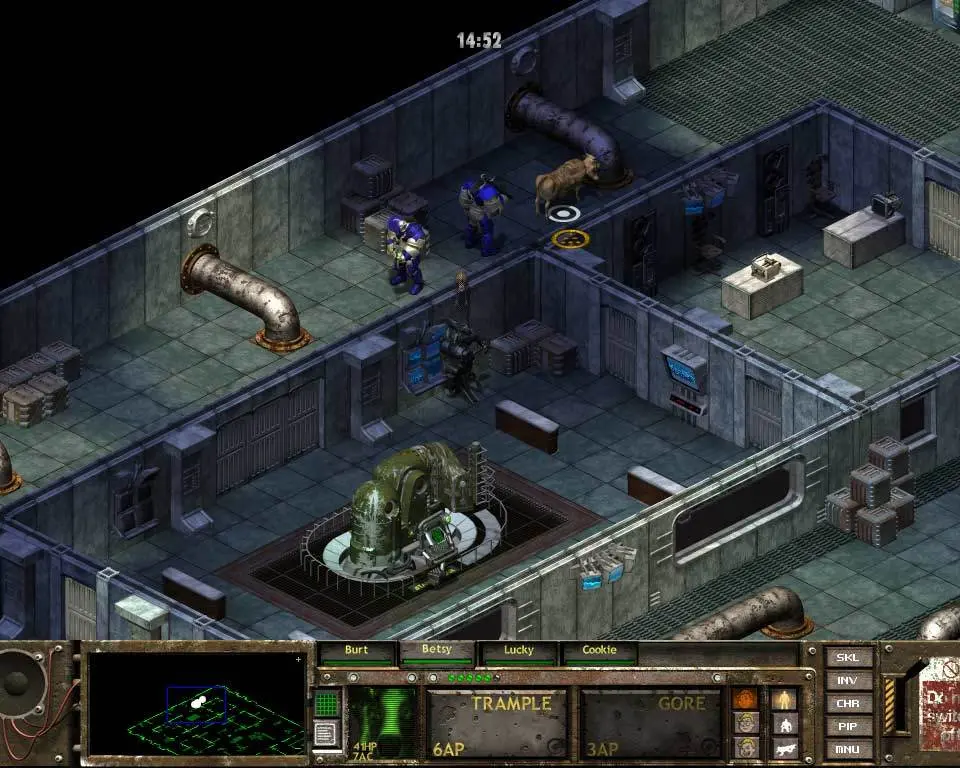
Fallout Tactics utilizes a classic isometric real-time with pause (RTwP) combat system. Movement is primarily controlled by clicking on the ground, while interacting with objects or enemies involves clicking on them. The camera can be rotated using the Q and E keys, and zoomed in/out with the mouse wheel. The User Interface (UI) is divided into several key areas: the character portrait bar at the bottom, displaying your squad members' health, action points, and status; the command bar above it, offering actions like 'Attack', 'Move', 'Use Skill', and 'Inventory'; and the mini-map in the top right corner. Familiarize yourself with hotkeys for quick access to inventory (I), character screen (C), and mission objectives (M). Mastering these controls is essential for efficient squad management and combat.