Phantom Chica's Behavior
Phantom Chica is one of the more straightforward Phantoms to manage, but her jumpscare can still lead to critical system errors if you're not careful. Understanding her trigger and how to react is key to maintaining your systems and surviving the night.
Triggering Phantom Chica
Phantom Chica's appearance is tied directly to the Camera System. Specifically, she will only manifest on CAM 07, which is the camera feed for the Arcade Room. Unlike some other Phantoms that have random spawn points, Chica is consistent in her location.
- Location: Always appears on CAM 07 (Arcade Room).
- Appearance: Her face will briefly appear on the arcade machine screen within the CAM 07 feed. It's a quick flash, so you need to be observant.
- Timing: Her appearance is somewhat random but becomes more frequent as the nights progress. She can appear at any time you are viewing CAM 07.
Avoiding the Jumpscare
The good news is that avoiding Phantom Chica's jumpscare is relatively simple once you know what to look for. The key is swift action.
- Monitor CAM 07 Carefully: When cycling through your cameras, pay close attention to CAM 07.
- Identify the Flash: As soon as you see her face flash on the arcade machine screen, immediately switch cameras or lower your monitor.
- Quick Reaction Time: You have a very short window to react. If you linger on CAM 07 for even a second or two after her appearance, she will jumpscare you.
Consequences of a Jumpscare
If Phantom Chica successfully jumpscares you, it will result in a significant system error, specifically a Ventilation Error.
- Ventilation Error: This is a critical system malfunction that needs immediate attention.
- Effects of Ventilation Error:
- Your office will begin to fill with smoke, obscuring your vision.
- This smoke makes it much harder to see Springtrap, increasing your risk of a fatal encounter.
- The error also makes it more difficult to hear audio cues, which are vital for tracking Springtrap.
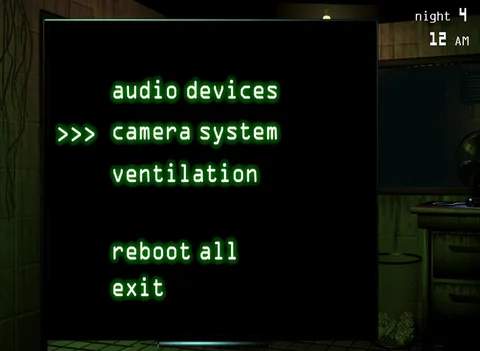
- Resolution: To fix the Ventilation Error, you must open your Maintenance Panel (accessed by clicking the panel on the right side of your desk) and click the "Reboot All" button, or specifically the "Ventilation" button if you're quick enough. This takes several seconds, during which you are vulnerable.
Strategic Considerations
- Prioritize Camera Checks: If you find yourself frequently using CAM 07 (perhaps to lure Springtrap), be extra vigilant for Chica's appearance.
- Minimize CAM 07 Exposure: If you're struggling with her, try to minimize the amount of time you spend viewing CAM 07. Only check it when absolutely necessary.
- Practice Quick Switching: Get into the habit of rapidly switching cameras or dropping your monitor. This skill is useful for avoiding other Phantoms as well.
- Audio Cues: While Phantom Chica herself doesn't have a distinct audio cue before her appearance, the sound of the Ventilation Error is a clear indicator that you've been jumpscared and need to act fast.
By understanding her predictable nature and practicing quick reflexes, Phantom Chica will become a minor nuisance rather than a major threat to your survival.