Game Mechanics Overview
Welcome, new Fazbear's Fright security guard! Unlike previous installations, Five Nights at Freddy's 3 introduces a unique set of mechanics that will test your nerves and strategic thinking. Forget doors and power; your primary concerns now revolve around maintaining critical systems and managing the singular, terrifying animatronic: Springtrap. Understanding these core mechanics is paramount to surviving your week.
The Monitor System
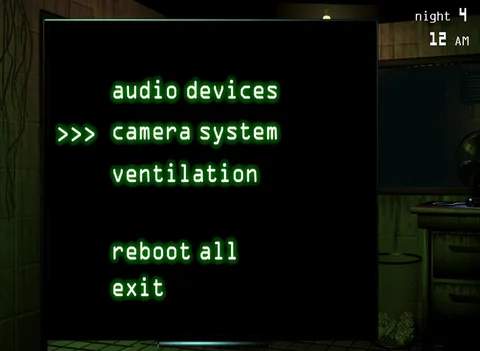
Your primary interface with Fazbear's Fright is the Monitor System, accessible by clicking the large monitor icon on your desk. This system is divided into two crucial sections:
- Camera System: This allows you to view various rooms within the attraction, from CAM 01 (Main Hall) to CAM 10 (Ventilation). Use the map on the left side of the screen to navigate between cameras. Your main goal here is to track Springtrap's movements. He will often appear in the darker areas, so pay close attention.
- Maintenance Panel: Located on the right side of the monitor, this panel is your lifeline. It displays the status of three critical systems:
- Audio Devices: Essential for luring Springtrap. If this system fails, you cannot play audio cues.
- Camera System: If this fails, your monitor will go dark, preventing you from tracking Springtrap or using audio.
- Ventilation: The most critical system. A ventilation error will cause your vision to blur, hallucinations to increase, and eventually lead to a blackout, leaving you vulnerable to Springtrap.
Actionable Tip: Always prioritize repairing the Ventilation system immediately when it goes down. A camera or audio error can be managed for a short period, but ventilation failure is a death sentence.
Audio Lures
The Audio Lure is your most effective tool against Springtrap. While viewing a camera, you can click the "Play Audio" button (represented by a speaker icon) to emit a child's voice. Springtrap is attracted to this sound and will move towards the camera where the audio was played. This is crucial for guiding him away from your office or into a specific vent.
- Strategy: If Springtrap is in CAM 02 (Game Area) and moving towards your office, play an audio lure in CAM 03 (Party Room) to redirect him.
- Limitation: You cannot play audio in the same room Springtrap currently occupies. You must lure him to an adjacent room.
- Cooldown: There's a brief cooldown after each audio lure, preventing spamming.
Ventilation System and Vent Seals
The Ventilation system is not just about preventing blackouts; it's also Springtrap's primary method of entering your office. He will often use the vents to bypass the main hallways.
- Vent Cameras: You can access a separate set of cameras specifically for the ventilation system by clicking the "Vent Map" button on the monitor. These cameras show the internal pathways of the vents.
- Sealing Vents: When Springtrap is in a vent camera, a "Seal Vent" button will appear. Clicking this will temporarily seal that specific vent section, forcing Springtrap to find another path or retreat. This is vital for preventing him from reaching your office directly.
- Strategic Sealing: If Springtrap is in Vent CAM 10 (leading directly to your office), immediately seal it. Then, use an audio lure in a distant main camera (e.g., CAM 04) to pull him out of the vents entirely.
Phantom Animatronics
You are not alone in Fazbear's Fright. Throughout the nights, various "Phantom" animatronics will appear as hallucinations. These are not physical threats but rather jump scares that cause system errors.
- Common Phantoms:
- Phantom Freddy: Walks past your office window. Ignore him. Looking at him too long will trigger a jump scare and a ventilation error.
- Phantom Foxy: Appears in your office. Quickly put up your monitor or look away to avoid his jump scare, which causes a ventilation error.
- Phantom Chica: Appears on CAM 07 (Arcade Room). Quickly switch cameras to avoid her jump scare and a camera error.
- Phantom Balloon Boy: Appears on various cameras. Quickly switch cameras to avoid his jump scare and a ventilation error.
- Phantom Mangle: Appears on CAM 04 (Party Room 2) and makes static noises. If you see her, quickly switch cameras to avoid her jump scare and an audio error.
- Phantom Puppet: Appears on CAM 08 (Main Hallway). If you see him, quickly switch cameras to avoid his jump scare, which causes a prolonged blackout.
- Impact: Each Phantom jump scare will cause one of your three systems (Audio, Camera, Ventilation) to fail, requiring you to reboot it from the Maintenance Panel.
- Survival Tip: The key to dealing with Phantoms is quick reflexes. As soon as you spot one, react immediately to avoid the jump scare and subsequent system failure.
Rebooting Systems
When a system fails due to a Phantom or simply malfunctions (which can happen randomly on later nights), you must reboot it from the Maintenance Panel. Click on the red "Error" button next to the failed system. This initiates a reboot sequence that takes a few seconds. During this time, you are vulnerable as you cannot use your cameras or audio lures.
- Prioritization: Always reboot Ventilation first, then Cameras, then Audio.
- Timing: Try to reboot systems when Springtrap is far away from your office, or when you have him lured to a distant camera.
Mastering these mechanics is the only way to survive the horrors of Fazbear's Fright. Stay vigilant, manage your systems, and use your audio lures wisely. Good luck, security guard!