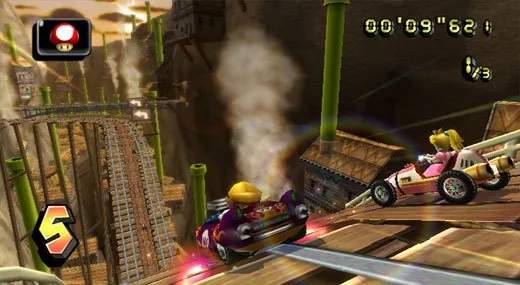
Controls
Mastering the controls in Mario Kart Wii is crucial for shaving seconds off your lap times and dominating your opponents. This section will break down the various control schemes and offer actionable strategies for each.
Wii Wheel / Wii Remote Horizontal
This is the iconic and most common way to play Mario Kart Wii, offering an intuitive, motion-controlled experience. Hold the Wii Remote horizontally, like a steering wheel.
- Steering: Tilt the Wii Remote left or right to steer your kart. Gentle movements are often more effective than wild flailing. Practice smooth turns to maintain speed through corners.
- Accelerate: Hold down the 2 Button to accelerate. Keep this pressed throughout the race unless you're intentionally slowing down for a tight turn or a specific maneuver.
- Brake/Reverse: Hold down the 1 Button to brake. If you're stationary, holding 1 will put you in reverse. Useful for backing out of sticky situations or correcting a missed turn.
- Use Item: Press the A Button or the Up Direction on the D-Pad to use your currently held item. Timing is everything!
- For offensive items like a Green Shell or Red Shell, consider your target's position.
- Defensive items like a Banana Peel or Green Shell can be held behind you by holding the item button, protecting you from incoming projectiles.
- The Mushroom is best used on straightaways or for cutting corners over rough terrain.
- Drift/Mini-Turbo: Hold the B Button while turning to initiate a drift.
- As you drift, sparks will appear under your kart. Yellow sparks indicate a Mini-Turbo, and blue sparks indicate a Super Mini-Turbo.
- Release the B Button when the sparks are at their brightest (blue for Super Mini-Turbo) to get a significant speed boost. This is a fundamental technique for competitive play.
- Practice drifting through every turn to maximize your speed.
- Look Behind: Press the Down Direction on the D-Pad to look behind you. Essential for anticipating incoming attacks (like a Red Shell) or accurately deploying items like a Banana Peel or Bomb behind you.
- Wheelie (Bikes Only): For bikes, quickly flick the Wii Remote upwards to perform a wheelie. This provides a temporary speed boost on straightaways but makes you more vulnerable to attacks and harder to steer. Use it strategically!
Wii Remote + Nunchuk
This setup offers more traditional analog stick control for steering, which some players find more precise.
- Steering: Use the Control Stick on the Nunchuk to steer. This provides fine-tuned control over your kart's direction.
- Accelerate: Hold down the A Button on the Wii Remote.
- Brake/Reverse: Hold down the B Button on the Wii Remote.
- Use Item: Press the Z Button on the Nunchuk or the Up Direction on the D-Pad on the Wii Remote to use your item.
- Drift/Mini-Turbo: Hold the Control Pad (D-Pad) Down on the Wii Remote while turning to drift. Release for the Mini-Turbo boost.
- Look Behind: Press the C Button on the Nunchuk.
- Wheelie (Bikes Only): For bikes, quickly flick the Wii Remote upwards.
Classic Controller
For players who prefer a traditional gamepad feel, the Classic Controller offers a familiar layout.
- Steering: Use the Left Analog Stick to steer.
- Accelerate: Hold down the A Button.
- Brake/Reverse: Hold down the B Button.
- Use Item: Press the X Button or the Y Button.
- Drift/Mini-Turbo: Hold the R Button while turning to drift. Release for the Mini-Turbo boost.
- Look Behind: Press the L Button.
- Wheelie (Bikes Only): Quickly flick the Left Analog Stick upwards.
Nintendo GameCube Controller
Veteran Mario Kart players might opt for the GameCube controller for its familiar ergonomics and precise analog input.
- Steering: Use the Control Stick to steer.
- Accelerate: Hold down the A Button.
- Brake/Reverse: Hold down the B Button.
- Use Item: Press the X Button or the Y Button.
- Drift/Mini-Turbo: Hold the R Button while turning to drift. Release for the Mini-Turbo boost.
- Look Behind: Press the L Button.
- Wheelie (Bikes Only): Quickly flick the Control Stick upwards.
Advanced Techniques for All Control Schemes
- Starting Boost: At the countdown, hold down your acceleration button right as the "2" disappears and the "1" appears. Perfect timing gives you a powerful starting boost.
- Slipstreaming: Drive directly behind another racer for a few seconds to build up a slipstream. You'll see wind effects around your kart, and then you'll receive a temporary speed boost, allowing you to slingshot past them.
- Item Holding: As mentioned, you can hold certain items (like Green Shells, Red Shells, and Banana Peels) behind you by holding the item use button. This acts as a shield against incoming projectiles, particularly useful against a Red Shell.
- Fake Item Box Placement: If you get a Fake Item Box, try to place it directly after a real item box or in a blind spot on the track to maximize its effectiveness.
- Shock Dodge: If you see the lightning bolt icon appear above your head, indicating a Lightning item is about to strike, try to use a Mushroom or hit a boost pad right before it hits. This can sometimes allow you to maintain your speed through the miniaturization effect.
Experiment with different control schemes to find what feels most comfortable and effective for your playstyle. Consistent practice with drifting and item usage will significantly improve your performance on the track!