Understanding Samus's Heads-Up Display (HUD) and the various menu screens is crucial for monitoring your status, navigating the environment, and managing your inventory. The HUD provides real-time information during gameplay, while the menus offer deeper insights and options.
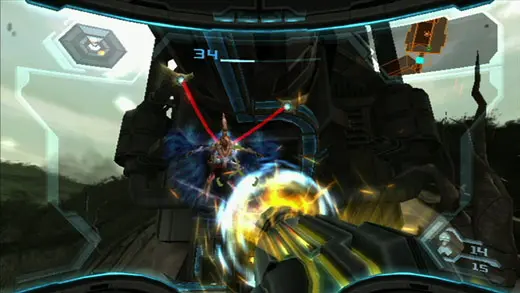
In-Game HUD Elements:
- Energy Tank Display: Located in the top-left, shows your current health and available Energy Tanks. Each tank represents 100 units of energy.
- Beam Weapon/Visor Display: Top-right, indicates your currently equipped Beam Weapon and Visor.
- Missile Count: Below the Beam/Visor display, shows your remaining Missiles.
- Phazon Meter: Appears when in Hypermode, indicating your Phazon corruption level and remaining Hypermode duration.
- Mini-Map: Bottom-left, provides a small, real-time overview of your immediate surroundings.
- Targeting Reticle: The crosshair in the center of the screen, used for aiming. It changes color to indicate lock-on status or scan availability.
Menu Screens:
- Logbook (Minus Button): Contains detailed information on scanned creatures, lore, and game progress. Essential for understanding the story and enemy weaknesses.
- Map (Plus Button): A 3D representation of the areas you've explored. Use it to find your way, identify unexplored rooms, and locate save stations.
- Pause Menu (1 Button): Allows you to save your game, adjust options, and exit to the title screen.
- Inventory/Equipment (2 Button): Displays your collected upgrades, Beam Weapons, and Visors.
Regularly checking your map and logbook can provide valuable clues and prevent you from getting lost. Pay close attention to your energy and missile counts, especially before entering challenging areas.