User Interface (UI)
The User Interface (UI) in both the NES and Game Boy Advance (GBA) versions of Metroid is designed for minimalism, prioritizing screen real estate for exploration and action. Despite its simplicity, it provides all critical information necessary for Samus Aran's mission. Understanding these elements is key to survival and efficient progression through Zebes.
While the core information displayed remains consistent across both platforms (Energy, Missiles), their visual representation and underlying mechanics differ significantly. This guide will detail each element, highlighting platform-specific nuances.
Energy Display
Your Energy Meter is your lifeline in Metroid. It indicates Samus's current health and capacity to withstand damage. When this meter depletes, Samus is defeated, resulting in a game over.
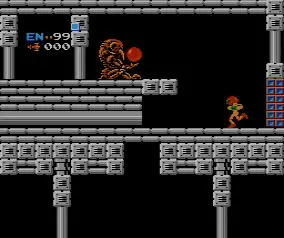
NES Metroid Energy Display
- Visual Representation: In the original NES Metroid, the Energy Meter is a single, horizontal bar located in the top-left corner of the screen. This bar fills from left to right as Samus's energy increases.
- Energy Units: Each full Energy Tank collected adds 100 units to Samus's maximum energy capacity. The bar visually represents this total. For instance, with no Energy Tanks, the bar represents 99 units. With one Energy Tank, it represents 199 units, and so on.
- Maximum Energy: Samus starts with 99 energy units. There are 8 Energy Tanks hidden throughout Zebes, allowing for a maximum total of 899 energy units (99 base + 800 from tanks).
- Replenishment: Energy can be restored by collecting small energy spheres dropped by defeated enemies, or by entering a Chozo Statue's chamber.
GBA Metroid (Metroid: Zero Mission) Energy Display
- Visual Representation: In Metroid: Zero Mission (GBA), the Energy Meter is typically displayed as a series of distinct, segmented bars. Each segment usually represents a fixed amount of energy.
- Energy Units: Each individual bar segment typically represents 30 units of energy. When Samus takes damage, these segments deplete from right to left.
- Energy Tanks: Collecting an Energy Tank in Zero Mission adds 100 units to Samus's maximum energy, which is visually represented by adding more segments to the energy bar display.
- Maximum Energy: Samus starts with 99 energy units (represented by three full bars and a partial fourth). There are 12 Energy Tanks to collect, each adding 100 maximum energy, for a total of 1299 energy units (99 base + 1200 from tanks).
- Replenishment: Similar to the NES version, energy is restored by collecting energy pickups from enemies or by utilizing Recharge Stations found in specific rooms.
Missile Count
Below the Energy Display, you will find your Missile Count. Missiles are a crucial secondary weapon system, essential for opening specific "Missile Doors" (red doors that require 5 missiles to open) and for dealing significant damage to tougher enemies and bosses.
NES Metroid Missile Count
- Visual Representation: A numerical display, typically showing "M: XX" or similar, indicating the current number of missiles Samus possesses.
- Missile Capacity: Samus starts with a capacity of 5 missiles. Collecting Missile Tanks increases this capacity by 5 missiles each.
- Maximum Missiles: There are 40 Missile Tanks hidden in the NES version, allowing for a maximum capacity of 255 missiles (5 base + 40 * 5). Note that the display caps at 255 due to technical limitations, even if more tanks are collected.
- Usage: Each missile fired consumes one unit from your count. Opening a Missile Door consumes 5 missiles.
- Replenishment: Missiles are restored by collecting small missile pickups dropped by defeated enemies, or by entering a Chozo Statue's chamber.
GBA Metroid (Metroid: Zero Mission) Missile Count
- Visual Representation: A numerical display, often showing "MISSILES: XX" or similar, clearly indicating the current missile count.
- Missile Capacity: Samus starts with a capacity of 5 missiles. Collecting a Missile Tank increases this capacity by 5 missiles.
- Maximum Missiles: There are 40 Missile Tanks available in Zero Mission, leading to a maximum capacity of 205 missiles (5 base + 40 * 5).
- Usage: Firing a missile consumes one unit. Opening a Missile Door consumes 5 missiles.
- Replenishment: Missiles are restored by collecting missile pickups from enemies or by utilizing Recharge Stations.
Reserve Tank (GBA Only)
Metroid: Zero Mission introduces the "Reserve Tank" system, a significant quality-of-life improvement not present in the original NES game.
- Functionality: Reserve Tanks automatically replenish Samus's main Energy Meter when it completely depletes, effectively giving Samus an extra life. They can also be manually activated from the pause menu to restore energy at will.
- Visual Representation: A separate icon, usually located near the main Energy Meter, indicates the presence and fill level of Reserve Tanks. Each Reserve Tank is a distinct item to collect.
- Capacity: There are 4 Reserve Tanks to collect in Zero Mission. Each tank can hold 100 units of energy.
- Replenishment: Reserve Tanks are filled by collecting energy pickups when Samus's main Energy Meter is already full.
Power-Up Display (GBA Only)
In Metroid: Zero Mission, the UI also provides a small indicator for currently active beam upgrades or other temporary power-ups, typically located near the main status displays. This allows players to quickly see which beam combinations are active without needing to open the pause menu.
- Beam Icons: Small icons representing collected beam upgrades (e.g., Long Beam, Ice Beam, Wave Beam, Plasma Beam) will appear, indicating their active status.
- Other Power-Ups: Temporary power-ups like the Screw Attack or Space Jump might also have a small visual cue when active, though their primary function is often tied to Samus's sprite animation.
Other UI Elements & Considerations
- Screen Real Estate: Both games prioritize a clean screen, dedicating the vast majority of the display to the game world. This enhances immersion and allows players to focus on platforming, combat, and exploration without excessive UI clutter.
- Pause Menu: For more detailed information, such as a map (GBA only), inventory of collected items, or options, players must access the pause menu. This keeps the primary gameplay screen uncluttered.
- Sound Cues: Beyond visual indicators, both games utilize distinct sound cues for low energy, collecting items, and other critical events, providing auditory feedback that complements the visual UI.
- Boss Health Bars (GBA Only): In Metroid: Zero Mission, boss encounters often feature a dedicated health bar for the boss, typically appearing at the bottom of the screen, providing players with a clear visual indication of their progress in the fight. This was not present in the original NES Metroid, where boss health was purely observational.
Understanding these UI elements is fundamental to mastering Metroid. Keeping a close eye on your energy and missile counts, and knowing how they differ between the NES and GBA versions, will significantly impact your survival and success in navigating the perilous world of Zebes.