
The User Interface provides crucial information during a match. At the top of the screen, you'll find the character portraits and health bars for both players. Below the health bars is the timer, indicating how much time is left in the round. The most important meters are located at the bottom of the screen. The blue meter is your SP Gauge, which fills as you deal and receive damage, and is used for powerful SP Skills and Awakened SP Skills. The green meter is your Burst Gauge, which fills slowly over time and can be used for a defensive Burst or an offensive One More! Burst. Finally, the small cards next to your character portrait represent your Persona Cards; losing all of them results in a Persona Break, temporarily disabling your Persona attacks.
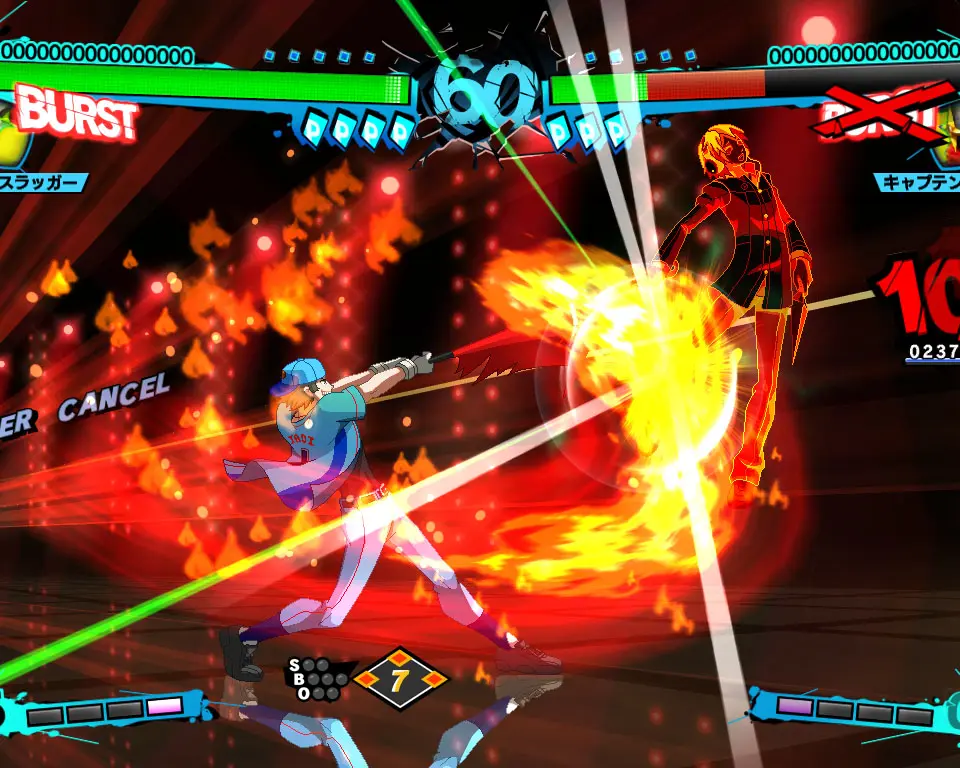
Paying attention to these meters is vital for strategic decision-making. Knowing when to use your SP for a powerful attack or save your Burst for a critical defensive maneuver can turn the tide of a match. Keep an eye on your opponent's meters as well to anticipate their next move.