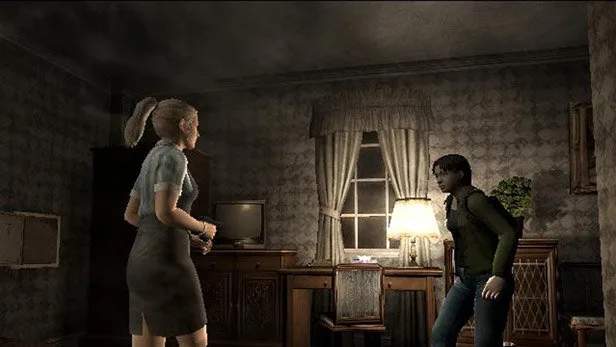
Multiplayer & Online Features
While Resident Evil Outbreak features a robust single-player experience, its true heart lies in its cooperative multiplayer. This section will guide you through the intricacies of online play, from setting up your game to effective team strategies.
Connecting Online (Historical Context)
Originally, connecting to the online servers required a PlayStation 2 Network Adapter and an active internet connection. Players would navigate to the "Online" option from the main menu. While official servers are no longer active, the spirit of online play lives on through fan-made servers and emulators, often requiring specific patches or configurations. Consult community forums for the most up-to-date methods for playing online in the modern era.
Creating or Joining a Game
Once connected to a server (official or fan-made), you'll typically have two main options:
- Create Game: This allows you to host a new session. You'll be able to select the scenario, difficulty, and set a password if you wish to play with specific friends.
- Join Game: This option presents a list of active games. You can filter by scenario or difficulty. If a game is password-protected, you'll need to enter the correct password to join.
Pro Tip: When creating a game, consider the scenario and character choices. Some scenarios, like "The Hive" or "Decisions, Decisions," benefit greatly from specific character abilities.
Character Selection & Team Composition
Your choice of character is crucial in online play, as each survivor possesses unique skills that can greatly benefit the team. A balanced team often includes:
- Combat Specialist: Characters like Kevin Ryman (starting with a .45 Automatic) or Mark Wilkins (high HP, strong melee) are excellent for dealing with threats.
- Support/Healer: George Hamilton (Medical Set, can craft healing items) or Cindy Lennox (Herb Case, can heal others) are invaluable for keeping the team alive.
- Utility/Explorer: David King (tool kit, can repair weapons) or Yoko Suzuki (large inventory, can hide) offer unique advantages for item management and puzzle solving.
- Speed/Agility: Alyssa Ashcroft (lockpicking, quick dodge) or Jim Chapman (coin toss for evasion, large inventory with backpack) can quickly navigate areas and retrieve key items.
Actionable Strategy: Before starting a scenario, communicate with your teammates (if possible, via voice chat or in-game text macros) to ensure a diverse and effective team composition. Avoid having too many characters with similar skill sets unless you have a specific, coordinated strategy in mind.
In-Game Communication & Item Sharing
Effective communication is paramount in Outbreak's online mode. The game offers several ways to communicate:
- Pre-set Phrases (Macros): Utilize the in-game macro system to quickly convey common messages like "Help!", "Follow me!", "I need ammo!", or "Let's go!". Customize these phrases in the options menu for maximum efficiency.
- Text Chat: If available on your platform/emulator, text chat allows for more detailed communication.
- Item Sharing: You can drop items for others to pick up. This is essential for distributing ammunition, healing items, or key items needed for puzzles. To drop an item, open your inventory, select the item, and choose "Drop."
Walkthrough Step: In "Outbreak," if a teammate is low on health and you have a Green Herb or Healing Spray, approach them, drop the item, and use the "Take this!" macro to alert them. Similarly, if you find a Handgun Ammo box and a teammate is using a handgun, share it!
Cooperative Puzzle Solving & Boss Strategies
Many scenarios feature puzzles or boss encounters that are significantly easier with coordinated teamwork:
- "Outbreak" Scenario:
- Key Card Retrieval: One player can distract zombies in the Main Hall while another retrieves the Blue Key Card from the Security Room.
- Bus Stop Barricade: Work together to push the Large Cabinet and Small Cabinet to block the bus stop entrance, preventing further zombie entry.
- "The Hive" Scenario:
- Leech Man: While one player draws the Leech Man's attention, another can focus on activating the Incinerator or finding the V-Poison in the B4F Lab.
- "Hellfire" Scenario:
- Fire Extinguisher: One player can secure the Fire Extinguisher from the 3F Office while another clears a path or deals with the approaching Lickers.
General Boss Strategy: For most bosses, a common tactic is to have one player act as a "tank" or distraction, drawing aggro, while other players focus on dealing damage or completing objectives. Always prioritize reviving downed teammates with Recovery Medicine or Blue Herbs if they are infected.
Understanding the Infection Timer
A core mechanic in Outbreak is the infection timer, represented by the "Virus Gauge." In online play, this adds an extra layer of urgency and cooperation:
- Managing Infection: If a teammate becomes infected, prioritize finding Antivirus or Blue Herbs to slow or cure the infection. George Hamilton's Medical Set can also craft Antivirus.
- Leaving Infected Teammates: While harsh, sometimes a severely infected teammate who is far from a cure might need to be left behind to ensure the survival of the rest of the team and completion of the scenario. This is a difficult but sometimes necessary decision in high-stakes situations.
By mastering these multiplayer and online features, you'll significantly increase your chances of survival and success in the treacherous world of Resident Evil Outbreak.