The Super Mario Bros. 3 UI is straightforward but provides all the essential information you need during gameplay. Understanding each element will help you strategize and keep track of your progress.
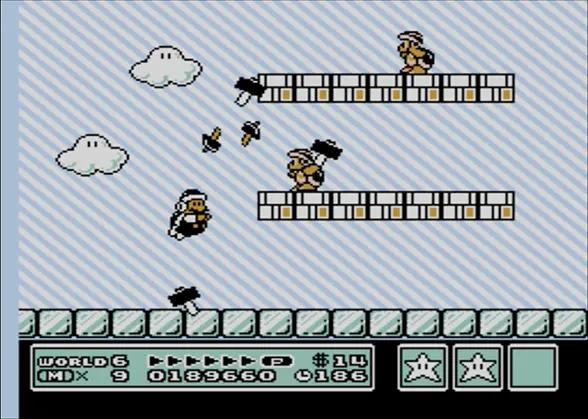
In-Game Screen:
- Top Left: Displays 'MARIO' (or 'LUIGI') and your current score. Collecting coins, defeating enemies, and grabbing power-ups all contribute to your score.
- Top Center: Shows the current World number and Stage number (e.g., 'WORLD 1-1').
- Top Right: Displays your remaining time. If the timer reaches zero, you lose a life.
- Bottom Left: Shows your current coin count. Collecting 100 coins grants you an extra life.
- Bottom Center: Displays your remaining lives. When you run out of lives, it's Game Over.
- Bottom Right: The 'P-Meter' (Power Meter). This fills up as you run. When it's full, and you're Raccoon Mario, you can fly by holding the A button after a running jump.
World Map Screen:
- Top Left: Displays your current score.
- Top Right: Shows your remaining lives.
- Bottom Center: Your item inventory. You can select an item to use before entering a stage.
Keep an eye on your timer and lives, especially in later, more challenging worlds. Don't be afraid to use your inventory items strategically on the World Map to gain an advantage.