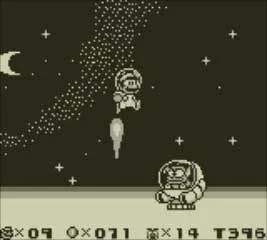
The game's UI is straightforward and provides all the necessary information at a glance. Understanding what each element represents will help you strategize and keep track of your progress.
- Coins: Displayed in the top-left corner. Collecting 100 coins earns you an extra life. Coins are also used in the mini-game at the end of each world.
- Lives: Shown as 'x' followed by a number in the top-left, next to your coin count. You start with 3 lives. Losing all lives results in a Game Over, sending you back to the title screen.
- Time: Located in the top-right corner. Most levels have a time limit. If the timer runs out, you lose a life. Keep an eye on it, especially in longer or more complex stages.
- Score: Displayed in the top-right, below the time. Your score increases by defeating enemies, collecting coins, and finishing levels quickly. While not directly impacting gameplay, it's a fun way to track your performance.
- Power-up Indicator: Mario's current power-up status is visually represented by his sprite. Small Mario has no power-up. Super Mario is larger. Fire Mario can shoot Superballs. Bunny Mario can float.
The world map also serves as a UI element, showing your progress, available levels, and the locations of the 6 Golden Coins you need to collect.