Version Differences (if applicable)
While Super Mario Land 2: 6 Golden Coins was released exclusively on the original Game Boy, making it a single-version title in terms of platform, there are subtle differences and considerations for players experiencing the game through various means today. These aren't "versions" in the traditional sense of a re-release or port, but rather how the game's presentation and mechanics might be subtly altered depending on the hardware or emulation used.
Original Game Boy (DMG-01) vs. Super Game Boy (SNES)
The most notable "version difference" comes when playing the original Game Boy cartridge on a Super Game Boy peripheral for the Super Nintendo. This offers several enhancements:
- Color Palettes: The Super Game Boy allows the game to be played in color, utilizing a pre-defined palette. While not a full-color remake, it adds a vibrant layer to the monochrome graphics. Some levels, like the bright greens of Tree Zone or the spooky purples of Pumpkin Zone, gain a new aesthetic.
- Custom Borders: The Super Game Boy often displays a custom border around the Game Boy screen. For Super Mario Land 2, this border typically features Mario-themed artwork, enhancing the presentation.
- Sound Enhancements: While the core sound effects and music remain the same, the Super Game Boy can sometimes offer a slightly richer audio output through the SNES's sound chip, though this is often subtle.
- Controller Mapping: Playing on a Super Game Boy allows you to use a standard SNES controller, which some players might find more comfortable than the original Game Boy's D-pad and buttons.
Actionable Tip: If you have access to a Super Game Boy, playing Super Mario Land 2 on it is highly recommended for the enhanced visual experience. The added color, while basic, can make identifying certain elements or distinguishing background from foreground slightly easier in some busy screens.
Nintendo 3DS Virtual Console Release
The game was re-released on the Nintendo 3DS Virtual Console, offering a digital version of the original Game Boy experience. Here's what to expect:
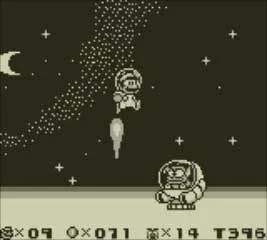
- Authentic Monochrome: The 3DS Virtual Console version faithfully reproduces the game in its original monochrome green-and-black (or customizable color filter) display, just as it appeared on the Game Boy.
- Save States: A key advantage of the Virtual Console is the ability to create "Restore Points" (save states) at any time. This can be incredibly useful for practicing difficult sections, experimenting with different paths in levels like the "Weird Miscellaneous Level" or "Hippo Level," or simply taking a break without losing progress.
- Screen Filters: The 3DS allows for various screen filters, including a "pixel-perfect" mode that displays the game at its original resolution, or a stretched mode to fill the screen. For the most authentic feel, the pixel-perfect mode is generally preferred.
- No Super Game Boy Features: Naturally, the 3DS Virtual Console version does not include the colorization or custom borders found when playing on a Super Game Boy.
Actionable Tip: Utilize the 3DS Virtual Console's Restore Points liberally. For instance, before attempting the challenging boss fight in Space Zone or navigating the intricate platforming of Mario Zone, create a Restore Point. If you fail, you can instantly reload and try again without losing lives or having to restart the entire level.
Emulation on Other Platforms
When playing Super Mario Land 2 through emulators on PC, mobile devices, or other consoles, the experience can vary widely based on the emulator's features and settings:
- Custom Color Palettes: Many emulators allow users to define custom color palettes, offering a more personalized color experience than the Super Game Boy's fixed options. You could, for example, create a sepia tone for Pumpkin Zone or a vibrant blue for Turtle Zone.
- Graphic Filters/Shaders: Emulators often include various graphic filters (e.g., scanlines, CRT effects) that can mimic the look of older televisions or enhance the pixel art. Experiment with these to find a visual style you prefer.
- Save States & Rewind: Similar to the 3DS Virtual Console, emulators almost universally offer save states and often a "rewind" feature, allowing you to instantly undo mistakes.
- Speed-Up/Slow-Down: Some emulators allow you to adjust the game speed. This can be useful for quickly traversing familiar areas or slowing down challenging sections to react more precisely.
Actionable Tip: If using an emulator, explore its settings for custom color palettes. A well-chosen palette can significantly improve the game's visual appeal without detracting from the original art style. For example, a warm, orange-heavy palette might make the Macro Zone feel more inviting, while a cool, blue palette could enhance the aquatic theme of the Turtle Zone.