The Super Mario Land UI is minimalist but provides all the essential information you need during gameplay. Keeping an eye on these indicators will help you manage your resources and track your progress.
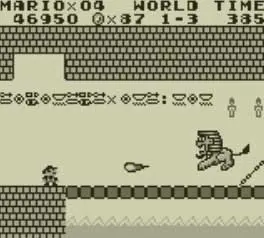
Top of the Screen:
- MARIO: Displays your current score. Collecting coins, defeating enemies, and breaking blocks all contribute to your score. While not directly impacting gameplay, a high score is a mark of skill.
- COINS: Shows the number of coins you've collected. Collecting 100 coins will grant you an extra life. Coins are scattered throughout levels and can be found in blocks or dropped by enemies.
- TIME: This is a countdown timer for the current stage. If the timer reaches zero, Mario loses a life. Some stages have more generous timers than others. Keep an eye on it, but don't rush so much that you make mistakes.
- WORLD: Indicates the current world and stage number (e.g., 1-1 for World 1, Stage 1). There are four worlds, each with three stages, culminating in a boss battle.
- LIVES: Displays the number of lives Mario has remaining. If Mario takes damage without a power-up, falls into a pit, or runs out of time, he loses a life. Game Over occurs when you run out of lives.
The UI is always visible during gameplay, allowing for quick glances without interrupting the action. There are no complex menus or inventory screens to worry about; everything you need to know is right there. Pay particular attention to your remaining lives and the time limit, as these are the most critical indicators for survival.