Understanding the controls is your first step. On the world map and in towns/dungeons, the D-Pad (or analog stick) moves your character. The 'A' button (or equivalent) is typically used for interaction (talking to NPCs, opening chests, examining objects). The 'B' button (or equivalent) is usually for canceling actions or running (hold it down while moving). The 'X' button (or equivalent) opens the main menu, where you can access your inventory, equipment, magic, and save your game. The 'Y' button (or equivalent) often serves as a quick-access button for a specific menu or action, depending on the version.
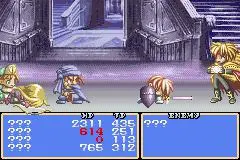
During battles, controls shift. The D-Pad moves Cress, while 'A' performs a standard attack. 'B' is often used for guarding. 'X' and 'Y' are typically assigned to Artes (special skills) or Magic. You can customize these assignments in the menu. Familiarize yourself with these controls in the early stages of the game, perhaps by engaging in a few easy battles, to build muscle memory. Effective movement and quick access to skills are vital for survival in later, more challenging encounters.