The User Interface (UI) in Shredder's Revenge provides crucial information during gameplay. Keeping an eye on these elements will help you make informed decisions in the heat of battle.
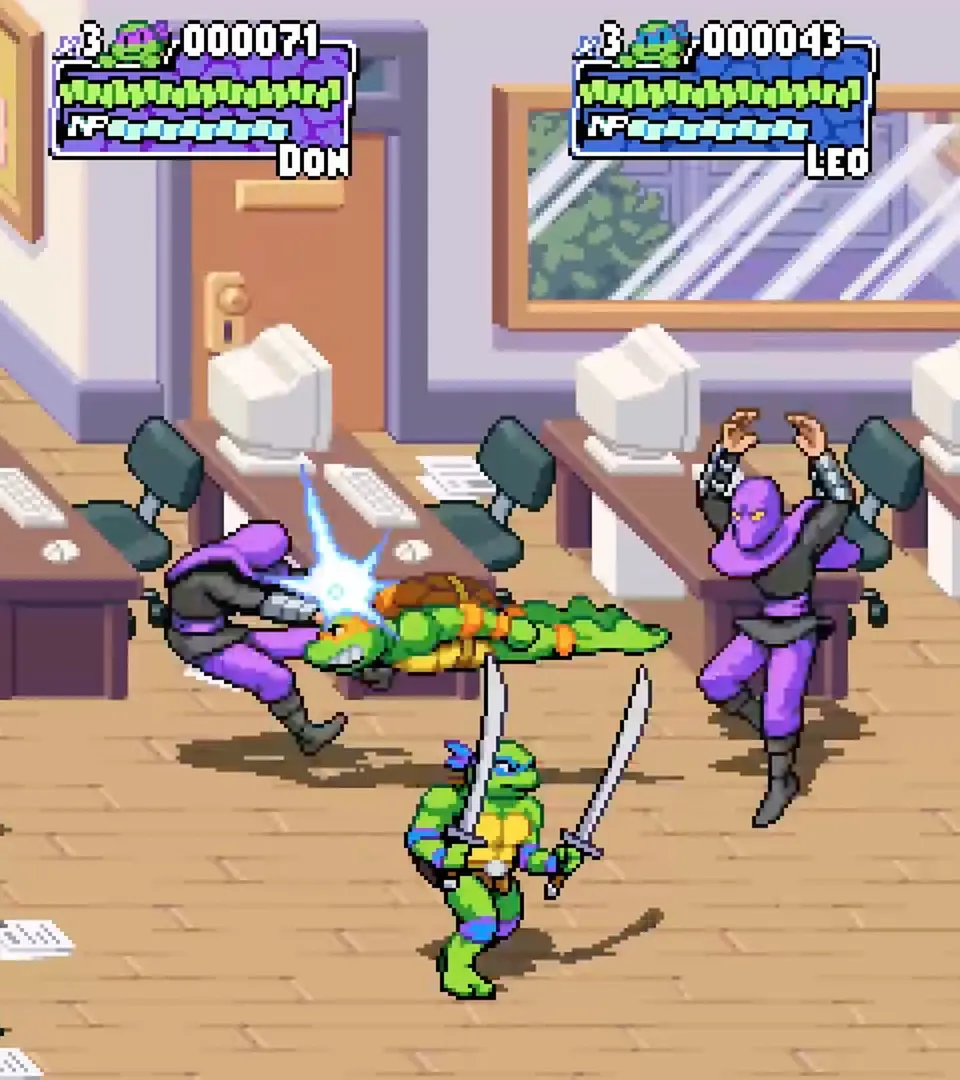
- Health Bar: Located at the top left of the screen for each player. This green bar indicates your current health. If it depletes, you lose a life.
- Special Meter: Below your health bar, this yellow meter fills as you land hits, take damage, or taunt. Each segment allows for a Special Attack. A full meter enables a Super Attack.
- Lives Counter: Usually displayed near your health bar, showing how many extra lives you have remaining. Losing all lives results in a 'Game Over'.
- Score: Top center of the screen. Your current score, which contributes to your overall rank at the end of each stage.
- Combo Counter: Appears near your character during combat. Shows how many hits you've landed in a continuous combo. Higher combos yield more points.
- Collectibles Tracker: In some stages, a small icon might appear to indicate nearby collectibles or secrets.
Familiarize yourself with these elements to effectively manage your resources and maximize your performance throughout the game.