Practice Mode Guide
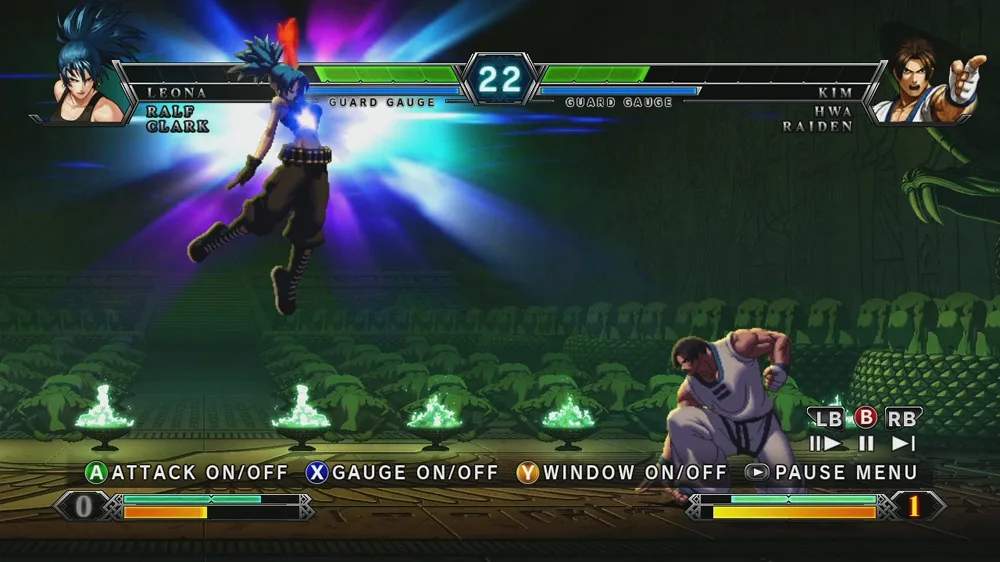
Welcome to the ultimate training ground for The King of Fighters XIII! Practice Mode is your dojo, your laboratory, and your path to mastering every character and mechanic. This detailed guide will walk you through its features, helping you transform from a button-masher to a combo-executing, pressure-applying KOF XIII champion.
Accessing Practice Mode
From the main menu, navigate to the "Training" option. Select your desired character and an opponent character. Don't worry too much about the opponent initially; you can change their settings later. Once loaded, you'll be dropped into a stage with your chosen fighters ready to rumble.
Understanding the Practice Menu
Once in Practice Mode, press the "Start" button (or its equivalent on your arcade cabinet/controller) to bring up the Practice Menu. This is where you'll find all the essential tools for your training. Familiarize yourself with these options:
- Character Select: Allows you to change your character or the opponent character without exiting Practice Mode. Essential for testing matchups.
- Dummy Settings: This is the heart of Practice Mode. Here you can control your opponent's behavior.
- Display Settings: Toggle various on-screen information.
- System Settings: Adjust game-specific mechanics like meter and health.
- Return to Game: Exit the menu and resume training.
- Exit Practice: Return to the main menu.
Dummy Settings: Your Training Partner
The "Dummy Settings" menu is where you'll spend most of your time configuring your practice sessions. Here's a breakdown of the crucial options:
Dummy Action
- Stand: The dummy stands still, allowing you to practice basic attacks, confirms, and spacing.
- Crouch: The dummy crouches, useful for testing low attacks and combos that require a crouching opponent.
- Jump: The dummy continuously jumps, perfect for anti-air practice.
- Guard All: The dummy blocks all attacks, ideal for practicing block strings, frame traps, and mix-ups.
- Guard First: The dummy blocks the first hit, then remains open. Great for practicing hit confirms into combos.
- Guard Random: The dummy randomly guards or stays open. Excellent for developing reaction time and recognizing openings.
- Attack: The dummy performs a specific attack. You can set which attack in the "Dummy Attack" sub-menu. Use this to practice punishing specific moves.
- Record: This powerful feature allows you to record a sequence of actions for the dummy to repeat.
Recording Dummy Actions (Record/Playback)
The "Record" option under "Dummy Action" is invaluable for advanced training:
- Select "Record" from the "Dummy Action" menu.
- You'll be prompted to record up to 10 seconds of input. Perform the actions you want the dummy to repeat (e.g., a specific combo, a pressure string, a reversal).
- Once recorded, select "Playback" from the "Dummy Action" menu. The dummy will now continuously perform your recorded sequence.
- Strategy: Use this to practice punishing specific opponent setups, defending against common pressure, or finding openings in a recorded block string. You can record a character's most dangerous block string and then practice escaping or finding a counter-attack.
Dummy Attack
When "Dummy Action" is set to "Attack," this sub-menu allows you to choose the specific move the dummy will perform. Select from their normal attacks, special moves, or even Desperation Moves. This is crucial for practicing specific punishes or understanding the properties of certain attacks.
Counter Attack Settings
This setting determines if the dummy will attempt a counter-attack after being hit or blocking. Options include:
- None: The dummy does not counter-attack.
- Reversal: The dummy attempts a reversal attack (e.g., a Dragon Punch) if possible after blocking or waking up. Essential for practicing safe pressure and meaty setups.
- After Guard: The dummy attempts a counter-attack after successfully blocking your attack.
Display Settings: Visual Feedback
These options provide crucial visual information during your training:
- Input Display: Shows your controller inputs on screen. Absolutely vital for checking if your inputs are clean and correct, especially for complex combos or charge moves.
- Frame Data Display: Displays the frame data for each move as it's performed (startup, active, recovery frames, and advantage/disadvantage on hit/block). This is for advanced players looking to understand frame traps, safe jumps, and punish windows.
- Damage Display: Shows the damage dealt by each hit in a combo. Useful for optimizing combo routes for maximum damage.
- Hitbox Display: Shows the active hitboxes and hurtboxes of characters. Advanced users can use this to understand attack priority and spacing.
System Settings: Manipulating the Game State
These settings allow you to control the game's resources and conditions:
- Power Gauge: Set your character's Power Gauge (meter) to Max, Normal (fills naturally), or Empty. Practice combos that require meter without having to build it up.
- Hyper Drive Gauge: Similar to the Power Gauge, control your Hyper Drive Gauge. Set it to Max for practicing Hyper Drive Combos or Neo Max moves.
- Health: Set your character's health to Max, Normal, or Low. Practice desperation tactics or low-health combos.
- Reset Position: Instantly reset both characters to the center of the screen. Saves time when practicing combos that push opponents to the corner.
Effective Practice Strategies
- Basic Movement and Normals: Start by getting a feel for your chosen character's movement, jumps, and normal attacks. Understand their range and speed.
- Special Move Execution: Practice each special move until you can perform it consistently on both sides of the screen. Use the "Input Display" to verify your inputs.
- Basic Combos: Learn and practice your character's fundamental combos. Start with simple two or three-hit sequences and gradually add more complexity.
- Hit Confirms: Set the dummy to "Guard First" or "Guard Random." Practice confirming a hit into a combo. This teaches you to react to whether your initial attack connects.
- Block Strings and Pressure: Set the dummy to "Guard All." Practice your offensive pressure, ensuring your block strings are tight and safe. Use "Frame Data Display" to identify frame traps.
- Anti-Airs: Set the dummy to "Jump." Practice consistently anti-airing with your character's best options.
- Punishes: Use "Dummy Attack" to have the opponent perform a specific unsafe move. Practice your most damaging punish combo for that move.
- Reversal Practice: Set "Counter Attack Settings" to "Reversal." Practice safe jumps and meaty attacks that beat or trade with the dummy's reversal attempts.
- Hyper Drive Combos: Set "Hyper Drive Gauge" to Max. Practice your character's full Hyper Drive Combos, focusing on execution and timing.
- Matchup Specific Training: Once you're comfortable with your character, use "Character Select" to pit yourself against characters you struggle against. Use "Record" to replicate their common strategies and find solutions.
Remember, consistency is key. Dedicate regular time to Practice Mode, focusing on one or two specific goals per session. With diligent practice, you'll see significant improvement in your KOF XIII gameplay!