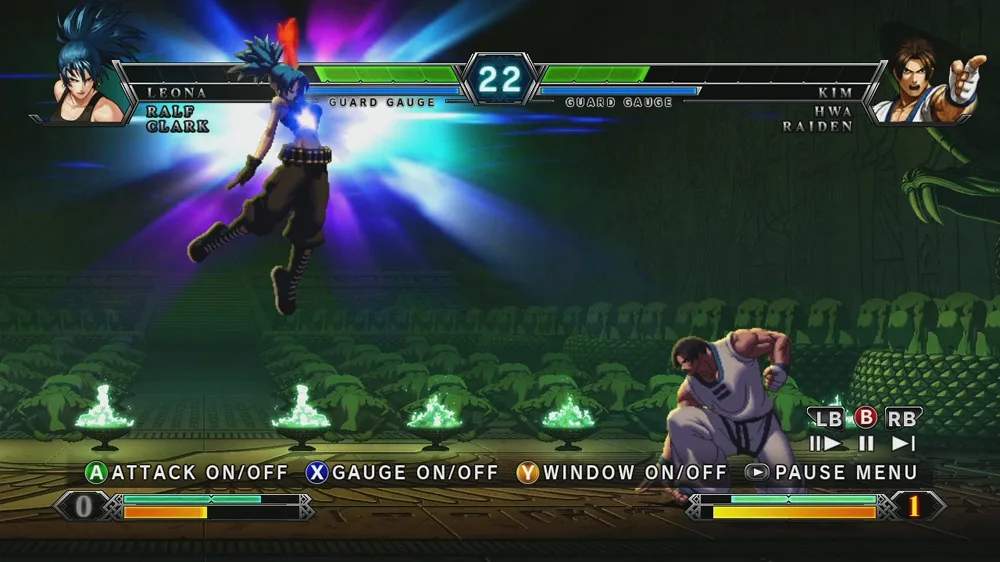
Replay Mode
The Replay Mode in King of Fighters XIII is an invaluable tool for players looking to refine their strategies, analyze their gameplay, and learn from both victories and defeats. This mode allows you to save and review your matches, offering a detailed breakdown of the action. Mastering its features can significantly accelerate your growth as a KOFXIII player.
Accessing Replays
To access the Replay Mode, follow these steps:
- From the main Arcade menu, navigate to the "Options" selection.
- Within the Options menu, select "Replay Mode".
- You will then be presented with a list of your saved replays.
Note: Replays are automatically saved after every match in certain modes, such as Arcade Mode and Versus Mode (if enabled). You can also manually save replays after a match by pressing the designated button (typically the Start button on most arcade setups) during the post-match results screen.
Replay Management
Effective management of your replays is crucial, especially if you're frequently recording matches. The Replay Mode offers several options for organizing your saved data:
- Load Replay: Select a replay from your list to begin playback.
- Delete Replay: Remove unwanted replays to free up storage space. It's recommended to periodically clear out less significant matches.
- Rename Replay: Give your replays descriptive names (e.g., "Kyo vs Iori - Perfect Round," "Combo Practice - Ash") to easily identify them later. This is particularly useful for tracking specific training sessions or memorable victories.
- Sort Replays: Organize your replays by date, character, or outcome to quickly find what you're looking for.
Analyzing Your Gameplay
Once you've loaded a replay, you'll have access to a suite of tools designed to help you dissect the match. These features are key to understanding your strengths and weaknesses:
Playback Controls
- Play/Pause: Standard playback controls. Use this to stop the action at critical moments.
- Fast Forward/Rewind: Quickly skip through less important sections or re-watch a specific sequence.
- Frame-by-Frame Advance: This is perhaps the most powerful tool. By advancing one frame at a time, you can precisely analyze hitboxes, hurtboxes, frame data, and the exact timing of inputs. This is essential for understanding why certain combos dropped or why you were punished.
- Change Perspective: Switch between player 1 and player 2's camera angles to get a different view of the action.
Information Overlay
During replay playback, you can toggle various information overlays to gain deeper insights into the match:
- Input Display: Shows the exact button presses and joystick movements for both players. This is invaluable for learning complex combos, understanding spacing, and identifying missed inputs. Pay close attention to the timing of special move inputs.
- Damage Counter: Displays the damage dealt by each hit in a combo or individual attack. Use this to evaluate the effectiveness of your offensive strategies.
- Meter Display: Shows the Super Meter and Hyper Drive Gauge levels for both players throughout the match. This helps in understanding meter management and when critical resources were spent or gained.
- Hitbox/Hurtbox Display: (Advanced Feature) While not explicitly labeled as such, by using frame-by-frame advance, you can visually infer the active frames of attacks (hitboxes) and vulnerable areas of characters (hurtboxes). This is crucial for understanding attack priority and counter-hit opportunities.
Strategic Applications
Here’s how to leverage Replay Mode for maximum improvement:
- Identify Bad Habits: Watch your losses. Are you consistently jumping into anti-airs? Are you whiffing important normals? Replays expose these patterns.
- Refine Combos: If a combo dropped, use frame-by-frame to see exactly where the timing was off or if an input was missed. Practice that specific section in Training Mode.
- Scout Opponents: If you frequently play against the same opponents, saving their replays allows you to study their tendencies, preferred setups, and defensive habits.
- Learn from Pros: If you have access to replays of high-level players, analyze their decision-making, spacing, and defensive techniques. Pay attention to their meter usage and when they choose to activate Hyper Drive.
- Celebrate Victories: Sometimes, it's just fun to re-watch that perfect combo or clutch comeback!
By diligently using the Replay Mode, you'll gain a comprehensive understanding of your gameplay and the mechanics of King of Fighters XIII, paving your way to becoming a true champion.