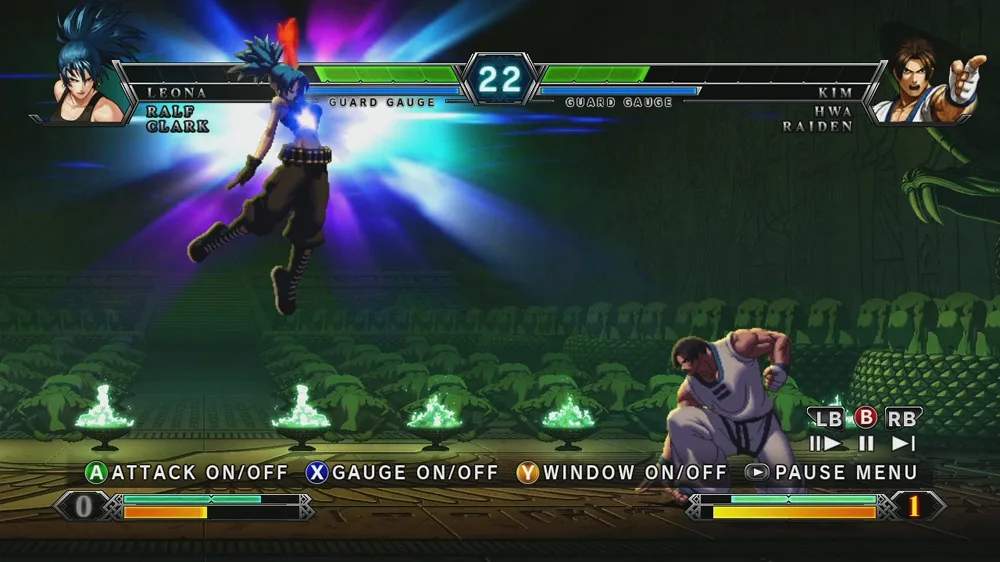
The KOF XIII UI provides crucial information during a match. Familiarizing yourself with it will help you make informed decisions in the heat of battle. Here's a breakdown of the key elements:

- Health Bar: Located at the top of the screen for each character. When it depletes, the character is knocked out.
- Power Gauge: Located at the bottom of the screen. This gauge fills as you land attacks, take damage, or perform certain actions. It has a maximum of 3 stocks (or 5 in some modes). Power Gauge stocks are used for EX Special Moves, Super Special Moves, Neo Max Super Special Moves, and Guard Cancels.
- Hyper Drive Gauge: Located above the Power Gauge. This gauge fills as you land attacks and perform special moves. When full, you can activate Hyper Drive Mode (HD Mode) by pressing HP + HK.
- Timer: Located at the top center of the screen. If the timer runs out, the character with more remaining health wins the round.
- Round Counter: Indicates how many rounds each player has won.
Keeping an eye on these gauges and the timer is vital for strategic play, allowing you to manage your resources effectively and plan your offensive and defensive maneuvers.