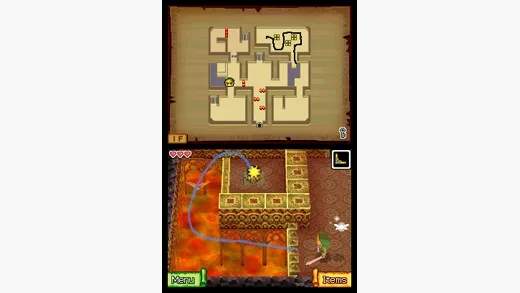
Phantom Hourglass Mechanics
Welcome, intrepid adventurer, to a detailed breakdown of the core mechanics that define your journey through the Great Sea in The Legend of Zelda: Phantom Hourglass. Mastering these elements is crucial for navigating the treacherous dungeons, outwitting formidable foes, and ultimately rescuing Tetra from the clutches of Bellum.
Touchscreen Controls: Your Primary Interface
Unlike traditional Zelda titles, Phantom Hourglass relies almost entirely on the Nintendo DS's touchscreen. This innovative control scheme is central to every action Link performs.
- Movement: Tap and hold the stylus on the lower screen in the direction you wish Link to move. The further from Link you tap, the faster he runs.
- Attacking:
- Sword Slash: Tap an enemy or swipe the stylus across Link to perform a basic sword attack. Experiment with different swipe directions (horizontal, vertical, circular) for varied attacks.
- Spin Attack: Quickly draw a circle around Link with the stylus to execute a powerful Spin Attack, damaging all nearby enemies.
- Item Usage:
- Equipping Items: Access your inventory by tapping the 'Items' icon on the bottom screen. Drag and drop a desired item into one of the two active item slots.
- Using Items: Once equipped, tap the item's icon to activate it. For projectile items like the Boomerang or Bow, tap the icon, then draw a path on the screen for the projectile to follow. For the Bomb, tap its icon, then tap where you want to place it.
- Interacting with the Environment: Tap on objects, characters, or points of interest to interact. This includes opening chests, talking to NPCs, or pushing blocks.
- Rolling: Quickly tap twice in a direction to make Link roll, useful for dodging attacks or crossing small gaps.
The Phantom Hourglass: Your Lifeline in the Temple of the Ocean King
The titular Phantom Hourglass is more than just a plot device; it's a vital gameplay mechanic, particularly within the dreaded Temple of the Ocean King.
- Time Limit: The sand within the Phantom Hourglass represents your remaining time inside the Temple of the Ocean King. Once the sand runs out, the invincible Phantoms will deal significantly more damage, often defeating Link in a single hit.
- Extending Time:
- Force Gems: These shimmering green gems are scattered throughout the Temple. Collecting them adds precious seconds to your hourglass. Prioritize collecting these, especially when exploring new areas.
- Small Force Gems: These add a small amount of time.
- Large Force Gems: These add a substantial amount of time.
- Permanent Time Upgrades: As you progress through the game and defeat bosses, you will earn additional sand for the Phantom Hourglass, permanently increasing your maximum time limit. These upgrades are crucial for tackling the deeper, more complex floors of the Temple.
Sailing and Sea Chart Navigation
The Great Sea is vast, and your trusty steamboat, the S.S. Linebeck, is your primary mode of transport. Navigation is a unique blend of touch controls and strategic planning.
- Drawing Your Course: On the top screen, you'll see the sea chart. To plot a course, tap the 'Route' icon on the bottom screen, then draw a path for the S.S. Linebeck to follow. You can draw multiple segments to navigate around islands or obstacles.
- Firing the Cannon: Tap the 'Cannon' icon on the bottom screen. Then, tap on the top screen where you want to fire. This is essential for destroying enemy ships, breaking obstacles, and solving sea puzzles.
- Salvage Arm: Once acquired, the Salvage Arm allows you to retrieve sunken treasures. When a sparkling spot appears on your map, sail over it and activate the Salvage Arm. Guide the arm down to the treasure chest, avoiding obstacles and sea creatures, to retrieve valuable items, ship parts, or even Heart Containers.
- Ship Parts: Collecting various ship parts (Hull, Chimney, Rail, Cannon, Wheel, Anchor) allows you to customize the S.S. Linebeck. Different parts offer varying defensive stats, which are crucial for surviving encounters with stronger enemy ships and sea monsters. Visit the Ship Shop on Mercay Island to equip new parts.
The Spirit Gems: Powering Up Link
Throughout your adventure, you'll collect three types of Spirit Gems: Power, Wisdom, and Courage. These gems are not just collectibles; they directly enhance Link's abilities.
- Power Gems (Red): Increase Link's attack power. Collect these to deal more damage to enemies and bosses.
- Wisdom Gems (Blue): Increase Link's defensive capabilities, reducing the damage he takes from enemy attacks.
- Courage Gems (Green): Increase the effectiveness of Link's special items, such as extending the range of the Boomerang or increasing the power of Bombs.
You can find Spirit Gems in chests, by defeating enemies, or by completing side quests. Visit the Spirit Sanctuary on Mercay Island to offer your collected gems to the three spirits. Each spirit will grant Link a permanent upgrade once enough gems of their respective type are offered.