The User Interface (UI) provides vital information during your adventure. Here's a breakdown of what you'll see on screen:
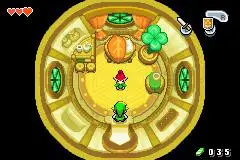
- Hearts: Located in the top-left corner, these represent Link's current health. Each full heart represents two hit points. Collect Heart Pieces to increase your maximum health.
- Rupees: Displayed in the top-right corner, this shows your current Rupee count. Rupees are the currency of Hyrule, used to buy items and upgrades.
- Equipped Items: Icons for your B and L button items are shown in the bottom-right corner.
- Magic Meter: Appears when you acquire items that use magic, such as the Gust Jar or Cane of Pacci.
- Minish Cap Icon: When Ezlo is on your head, this icon indicates your ability to shrink or grow at specific portals.
Keeping an eye on your health and Rupees is crucial. Always be aware of your equipped items, as quick switching can be the difference between success and failure in combat or puzzle-solving. The magic meter, when present, will deplete as you use certain items, so manage your magic wisely. Understanding the UI will allow you to make informed decisions and react quickly to the ever-changing situations in Hyrule.