The User Interface in The Legend of Zelda is minimalist but provides all the essential information you need. At the top of the screen, you'll find several key indicators. On the far left is your Life Meter, represented by hearts. Each full heart signifies two units of health. When you take damage, hearts will deplete. If all hearts are gone, Link perishes. To the right of your Life Meter is your Rupee count, indicating how much currency you possess. Rupees are vital for purchasing items and upgrades from shops.
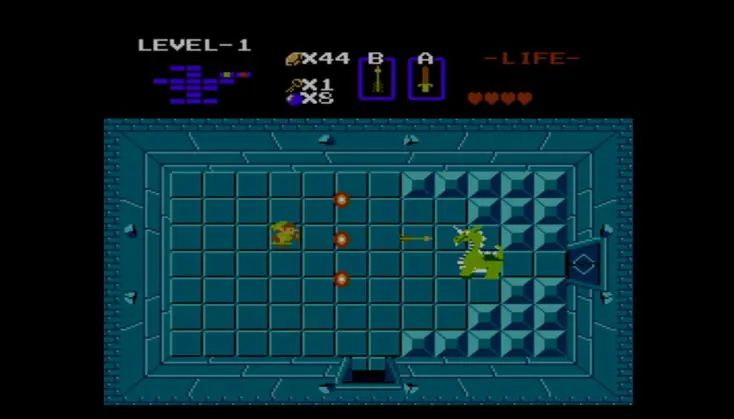
Further to the right, you'll see a small box displaying your currently equipped secondary item. This is the item that will be used when you press the 'B' button. Below this, you'll often see a count for certain items, such as Bombs or Arrows. Finally, the map in the top right corner shows your current location within the Overworld or dungeon. Pay close attention to your Life Meter, as it's your primary indicator of survival. Always keep an eye on your Rupee count to ensure you can afford essential purchases.