Custom Scenarios
While the epic campaigns of Warcraft II: Tides of Darkness provide countless hours of strategic enjoyment, the game's true longevity and community engagement often stem from its robust custom scenario capabilities. Beyond the pre-packaged challenges, Warcraft II empowered players to craft their own battlegrounds and narratives, fostering a vibrant ecosystem of user-generated content that continues to be explored by enthusiasts today.
Accessing Pre-Made Custom Scenarios
Blizzard thoughtfully included a selection of official custom scenarios designed to test specific strategic skills or offer unique, self-contained challenges. These are an excellent starting point for players looking to diversify their gameplay experience without diving into the complexities of user-created content.
- Navigation: From the main menu, select 'Single Player', then choose 'Custom Scenario'.
- Selection: You will be presented with a list of pre-installed scenarios. Each typically has a brief description outlining its objective or unique ruleset.
- Faction & Difficulty: Before starting, you can usually select your desired faction (Orcs or Humans) and adjust the difficulty level. Experiment with these settings to find the optimal challenge for your skill level.
These official scenarios often feature:
- Survival Maps: Defend a static position against waves of increasingly powerful enemies.
- Resource Scarcity Challenges: Win a battle with extremely limited resources, forcing efficient unit production and tactical engagements.
- Tactical Puzzles: Achieve victory with a pre-set army against a specific enemy formation, requiring precise micro-management and unit positioning.
- Race to the Finish: Often involves expanding rapidly to secure a specific objective or destroy a key enemy structure before your opponent.
Unleashing Creativity: User-Created Scenarios and the Map Editor
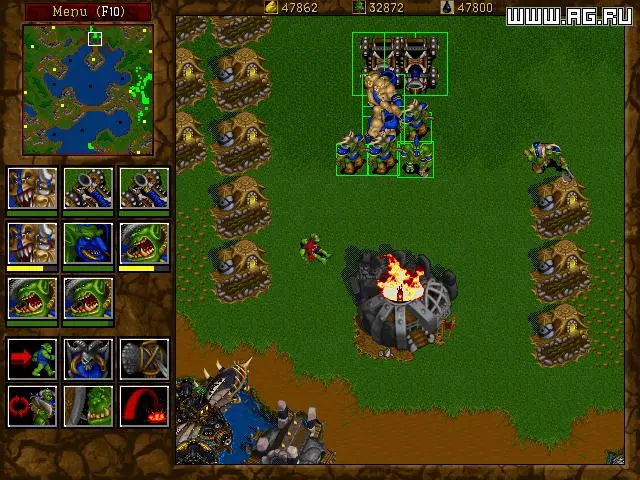
The true heart of Warcraft II's custom content lies in the ability for players to create and share their own maps. This feature significantly extended the game's lifespan and fostered a dedicated community.
The Warcraft II Map Editor (Warcraft II Scenario Editor)
Included with most PC versions of Warcraft II: Tides of Darkness (and its expansion, Beyond the Dark Portal), the Scenario Editor is a powerful tool that allows players to design their own maps from the ground up. While not as intuitive as modern editors, it provided immense creative freedom.
- Accessing the Editor: On PC, the editor is typically a separate executable file (e.g.,
Warcraft II Editor.exeorWarcraft II Scenario Editor.exe) located in your game's installation directory. For Classic Macintosh users, it would be found within the game application folder. - Key Editor Features:
- Terrain Painting: Sculpt the landscape with various terrain types (grass, dirt, water, lava, snow, etc.).
- Unit & Building Placement: Position starting units, buildings, resources (gold mines, oil patches), and neutral structures.
- Trigger System: This was the most advanced feature, allowing creators to script events based on in-game actions. Examples include:
- "If Player 1 destroys Building X, then Player 2 receives 500 Gold."
- "If Unit Y enters Region Z, then a wave of enemies spawns."
- "Timer reaches 10 minutes, then Player 3 wins."
- Player Configuration: Set starting resources, technology levels, and team alliances for each player slot.
- Fog of War & Vision: Define initial visibility for players.
Common User-Created Scenario Types
The flexibility of the editor led to a diverse array of custom map genres. Here are some popular examples:
- Hero Defense (TD Precursor): Players control a powerful hero unit (or a small group) and must defend a specific point against endless waves of enemies, often relying on strategic unit placement and upgrades.
- Resource Race: Two or more players compete to gather a set amount of resources (e.g., 10,000 Gold, 5,000 Lumber) first, often leading to aggressive early game expansion and raiding.
- Maze Maps: Players navigate a complex, often trap-filled maze, fighting off enemies and solving puzzles to reach an objective.
- RPG/Adventure Maps: More narrative-driven, these maps often feature custom quests, unique items, and a focus on exploration and character progression rather than traditional base-building.
- "Hunger Games" / Battle Royale: Players start with minimal resources or units in a large map and must scavenge, build, and fight to be the last one standing.
- Tower Defense (Early Forms): While not as sophisticated as modern TD games, some maps involved building static defenses to funnel and destroy incoming enemy waves.
- Micro Challenge Maps: Designed to test a player's ability to control a small group of units effectively, often against superior numbers or specific enemy compositions.
Finding and Playing Community-Made Maps
While Warcraft II is an older title, its community has preserved many of these classic custom maps. Locating them today often requires a bit of digital archaeology.
- Online Archives & Fan Sites: Many older gaming communities and fan sites (e.g., those dedicated to classic Blizzard games, RTS archives) host collections of custom
.pud(for Warcraft II: Tides of Darkness) or.wpe(for Warcraft II: Beyond the Dark Portal) map files. A quick search for "Warcraft 2 custom maps download" or "Warcraft 2 .pud files" can yield results. - Community Forums: Dedicated forums for classic RTS games or Warcraft II specifically are excellent places to ask for map recommendations or direct links.
- Installation:
- Once you've downloaded a
.pudor.wpefile, you'll need to place it in the correct directory within your Warcraft II installation. For most PC versions, this is typically theScenariosfolder (or sometimesMaps). - Ensure the file name ends with the correct extension (e.g.,
MyAwesomeMap.pud).
- Once you've downloaded a
- Playing the Map:
- Launch Warcraft II.
- Go to 'Single Player' and then 'Custom Scenario'.
- Your newly added map should now appear in the list alongside the official scenarios. Select it to play.
Important Considerations for User-Made Maps:
- Compatibility: Ensure the map file is for the correct version of Warcraft II you are playing (e.g., Tides of Darkness maps for Tides of Darkness, Beyond the Dark Portal maps for the expansion).
- Quality Varies: User-made maps can range from brilliantly designed masterpieces to quickly made, unbalanced experiments. Be prepared for a mixed bag.
- Multiplayer: Many custom maps were designed with multiplayer in mind. While you can often play them in single-player against AI, their full potential might be realized with human opponents. Modern solutions like Warcraft II Combat Edition or Warcraft II BNE provide updated multiplayer support for playing these classic maps online.
Diving into the world of custom scenarios, both official and community-made, offers an almost endless supply of strategic challenges and creative gameplay experiences, truly cementing Warcraft II: Tides of Darkness as a timeless classic.