Advanced Hotkey Usage
While the foundational hotkeys for unit movement and basic commands are essential, truly mastering Warcraft II: Tides of Darkness, especially in competitive multiplayer or challenging campaign missions, hinges on advanced hotkey utilization. This section will transform your gameplay from reactive clicking to proactive command execution, significantly boosting your Actions Per Minute (APM) and overall strategic efficiency.
Core Hotkey Principles & Customization
Unlike modern RTS titles, Warcraft II offers limited hotkey customization. Therefore, understanding and internalizing the default hotkey layout is paramount. The goal is to keep your eyes on the battlefield while your fingers fluidly issue commands. Practice is key; dedicate time to training against AI or in custom games solely focused on hotkey execution.
Essential Command Hotkeys:
- Movement & Attack:
- M: Move (Sends selected units to a location)
- A: Attack (Orders selected units to attack a target or move to an area, engaging any enemies encountered)
- P: Patrol (Units move between two points, attacking enemies within range)
- G: Guard (Units remain in an area, attacking enemies that come within range)
- F: Follow (Selected unit follows another friendly unit)
- H: Hold Position (Units stop moving and attack only enemies that come within range, without pursuing)
- S: Stop (Immediately halts all selected units' current actions)
- Unit Production & Building Commands:
- B: Build (Opens the build menu for Peasants/Peons)
- T: Train (Opens the train menu for Barracks/War Mills, etc.)
- R: Repair (Orders a Peasant/Peon to repair a damaged building or mechanical unit)
- D: Disarm (For Sappers/Goblin Sappers, disarms a mine)
- Special Unit Abilities:
- C: Cast (Initiates spell casting for Mages/Death Knights. You then select the specific spell via its hotkey, e.g., F for Flame Strike, R for Runes, H for Holy Vision, S for Slow, P for Polymorph, D for Death Coil, U for Unholy Armor, S for Sight, R for Raise Dead, H for Haste, D for Death and Decay)
- E: Explode (For Sappers/Goblin Sappers)
- L: Load (For Transports/Destroyers, loads units)
- U: Unload (For Transports/Destroyers, unloads units)
- Interface & View Hotkeys:
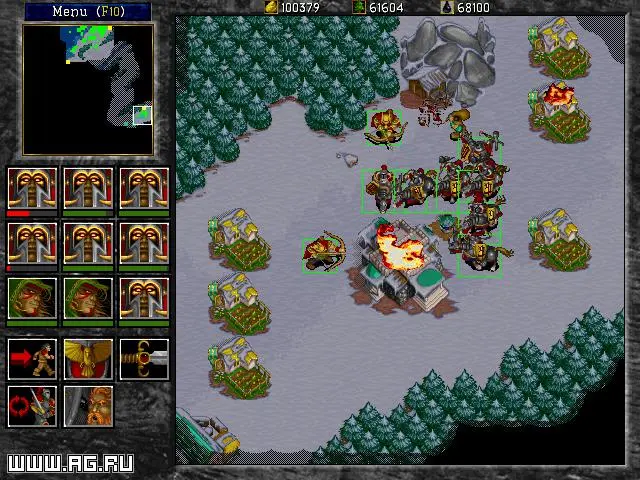
- Spacebar: Centers view on the last event (e.g., unit completion, attack)
- F1-F12: Can be used for custom camera locations (Ctrl + F# to save, F# to recall)
Advanced Techniques for Efficiency
1. Control Group Mastery (Ctrl + 0-9)
This is the cornerstone of advanced hotkey usage. Beyond just grouping combat units, apply control groups strategically:
- Production Buildings: Assign your Barracks, Shipyard, Stables, Foundry, Mage Tower/Temple of the Damned to dedicated control groups (e.g., Ctrl + 0 for Barracks, Ctrl + 9 for Shipyard). This allows you to quickly select a production building and queue units without ever clicking back to your base. For example, press 0, then T, then the hotkey for the desired unit (e.g., F for Footman).
- Worker Groups: Designate a control group for your primary gold miners and another for lumberjacks. This makes it easy to quickly check their status, send them to new resources, or pull them for repairs/defense.
- Scouting Units: Assign fast-moving scouts (Gryphon Riders, Dragon Riders, Knights, Ogres) to a control group for rapid reconnaissance and harassment.
- Spellcasters: Group your Mages/Death Knights separately from your main combat force. This allows for precise spellcasting without accidentally moving your entire army.
- Damaged Units: In intense engagements, quickly select and retreat damaged units by assigning them to a temporary control group.
2. Shift-Queuing Commands
Shift-clicking or Shift-hotkeying allows you to queue multiple commands for a unit or group, enabling complex actions without constant supervision.
- Patrol Routes: Select a unit, press P, click the first point, then Shift + Click subsequent points to create a multi-point patrol route.
- Construction Chains: Select a Peasant/Peon, press B, then Shift + Click to build multiple structures in sequence. The worker will automatically move to and construct each building.
- Resource Gathering: Select a worker, Shift + Click on a gold mine, then Shift + Click on your Gold Mine/Town Hall. The worker will continuously mine and return resources.
- Attack-Move Paths: Select combat units, press A, then Shift + Click along a path. Your units will move along the path, engaging any enemies they encounter. This is invaluable for clearing areas or advancing safely.
- Spellcasting Sequences: For Mages/Death Knights, you can queue spells. Select a spellcaster, press C, then the spell hotkey (e.g., F for Flame Strike), click target, then Shift + C, another spell hotkey, click target. This is particularly useful for setting up combos like Slow followed by Death Coil.
3. Rapid Fire Production
This technique, while simple, drastically increases your unit output. Once you have a production building (e.g., Barracks) assigned to a control group (e.g., 0):
- Select the building: Press 0.
- Initiate training: Press T.
- Spam the unit hotkey: Repeatedly press the hotkey for the unit you want to produce (e.g., F for Footman). Each press will queue another unit, as long as you have the resources and population capacity.
Combine this with cycling through multiple production buildings (e.g., 0 then TFF, then 9 then TGG for two different unit types) for unparalleled production speed.
4. Micro-Managing Engagements with Hotkeys
During battles, every second counts. Hotkeys allow for precise unit control:
- Target Firing: Select a group of units, press A, then click on a high-priority enemy unit (e.g., enemy spellcaster, siege unit). This focuses fire and eliminates threats quickly.
- Retreating Damaged Units: As units take damage, quickly select them (often by clicking their portrait in the selection panel or using a pre-assigned control group), then press M and click a safe retreat point.
- Spellcaster Focus: Keep your Mages/Death Knights on a separate control group. During a fight, quickly switch to them (e.g., press 7), cast a crucial spell (e.g., C then S for Slow on enemy melee), then switch back to your main army.
- Siege Unit Positioning: Catapults/Ballistas are slow. Use Shift + M to queue their movement to a strategic position, then Shift + A to queue an attack on a building or clump of units.
Common Pitfalls & Tips
- Over-Reliance on Clicking: The biggest hurdle is breaking the habit of clicking every command. Force yourself to use hotkeys even if it feels slower initially.
- Forgetting Control Groups: Periodically check your control groups to ensure they are assigned correctly, especially after unit production or losses.
- Ignoring Interface Hotkeys: Using Spacebar to jump to events or F1-F12 for camera locations can save precious seconds in critical moments.
- Practice, Practice, Practice: There's no shortcut. Play custom games with the sole purpose of practicing hotkey usage. Start with basic production, then move to complex unit micro.
- use the Mini-Map: While not a hotkey, combining hotkeys with mini-map clicks (e.g., M then click on mini-map) is incredibly efficient for large-scale movements.
By integrating these advanced hotkey techniques into your gameplay, you will not only increase your APM but also gain a significant strategic advantage, allowing you to manage your economy, production, and military engagements with unparalleled precision and speed. This mastery is what separates a good player from a truly exceptional one in Warcraft II: Tides of Darkness.