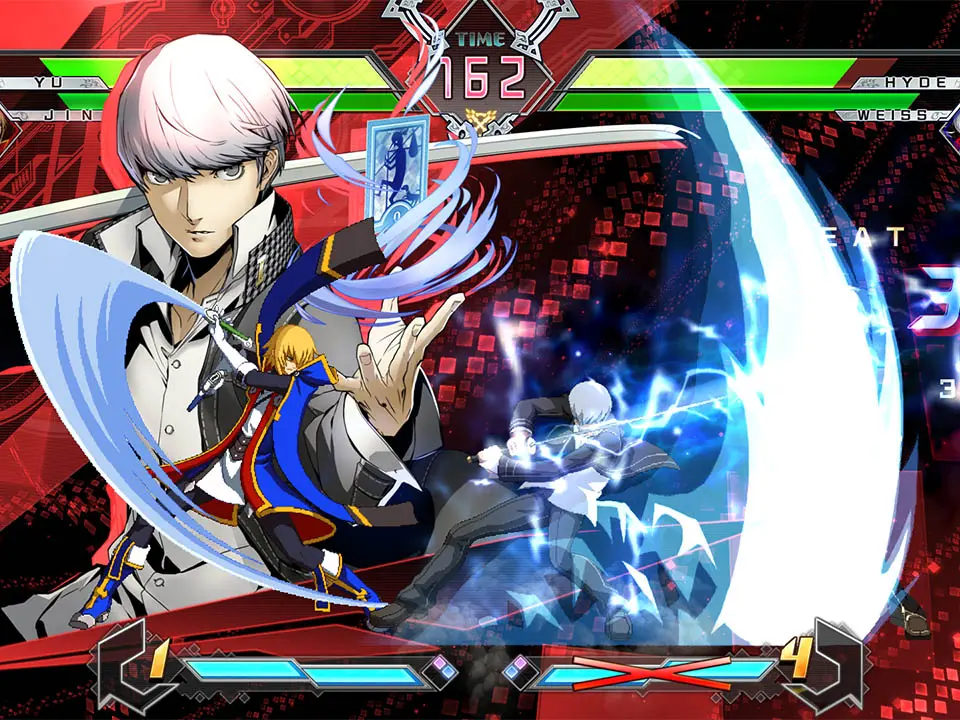
The User Interface (UI) in BlazBlue: Cross Tag Battle provides vital information during a match. At the top of the screen, you'll find the health bars for both teams. Below the health bars are the Burst Gauge and the Skill Gauge. The Burst Gauge allows you to perform a powerful defensive maneuver, while the Skill Gauge is consumed by special moves and Distortion Skills. Pay close attention to your partner's portrait; it indicates their current status and availability for assists. Understanding these elements is key to making informed decisions in battle and managing your resources effectively.
UI Elements:
- Health Bars: Displays the remaining health of each character. Deplete your opponent's health to win the round.
- Burst Gauge: Fills as you take damage. When full, press A+B+C to perform a Burst, knocking opponents away and providing invincibility.
- Skill Gauge (Meter): Divided into 9 segments. Consumed by special moves, Distortion Skills, and Resonance Blaze. Regenerates slowly over time and by attacking.
- Partner Portrait: Shows your partner's current status. A greyed-out portrait means they are unavailable for assists.
- Timer: Counts down the remaining time in the round. If time runs out, the team with more total health wins.