
Fallout 2 uses a point-and-click interface for most actions. The left mouse button is used for movement, interaction, and selecting targets. The right mouse button cycles through available actions (e.g., talk, open, use, attack). Holding down the left mouse button allows you to drag items or move your character continuously.
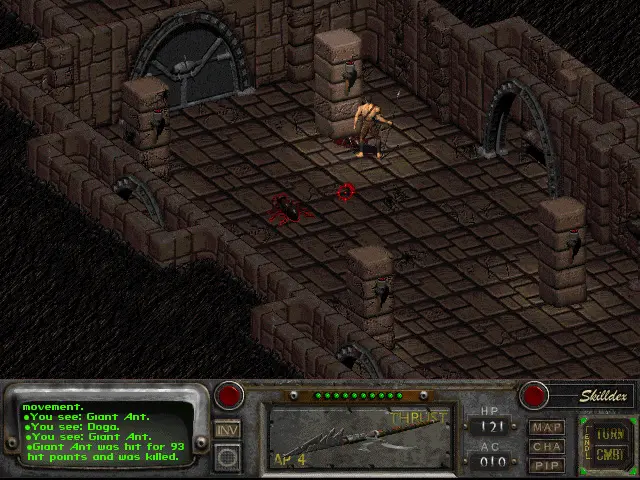
Key Interface Elements:
- Action Bar: Located at the bottom of the screen, this displays your equipped weapon, active skill, and quick slots.
- Inventory: Accessed via the 'I' key or the backpack icon. Manage your items, equip gear, and use consumables here.
- Character Sheet: Press 'C' to view your character's stats, skills, perks, and traits.
- World Map: Press 'M' to access the global map for travel between locations.
- Pip-Boy: Your trusty wrist-mounted computer, accessed via 'P'. It contains your character sheet, inventory, world map, and quest log.
- Combat Mode: Press 'A' to toggle combat mode. In combat, you spend Action Points (AP) to move, attack, and use items.
Familiarize yourself with these controls and the interface early on. Efficient navigation and action selection are crucial for survival in the wasteland.
Compare basic controls & interface inFallout: New Vegas