
Master the online ranked ladder in Melty Blood: Type Lumina. Learn about online modes, connection optimization, and strategies to climb the ranks.
Diving into the online arena of Melty Blood: Type Lumina is where your true skills will be tested. This guide will walk you through the various online modes, how to optimize your connection, and strategies to climb the Ranked Ladder.
Connecting to the Online Lobby
Before you can challenge other players, you need to access the online modes. From the Main Menu, navigate to the "Network Mode" option. Here, you'll find several choices:
- Ranked Match: This is where you'll compete for your global ranking.
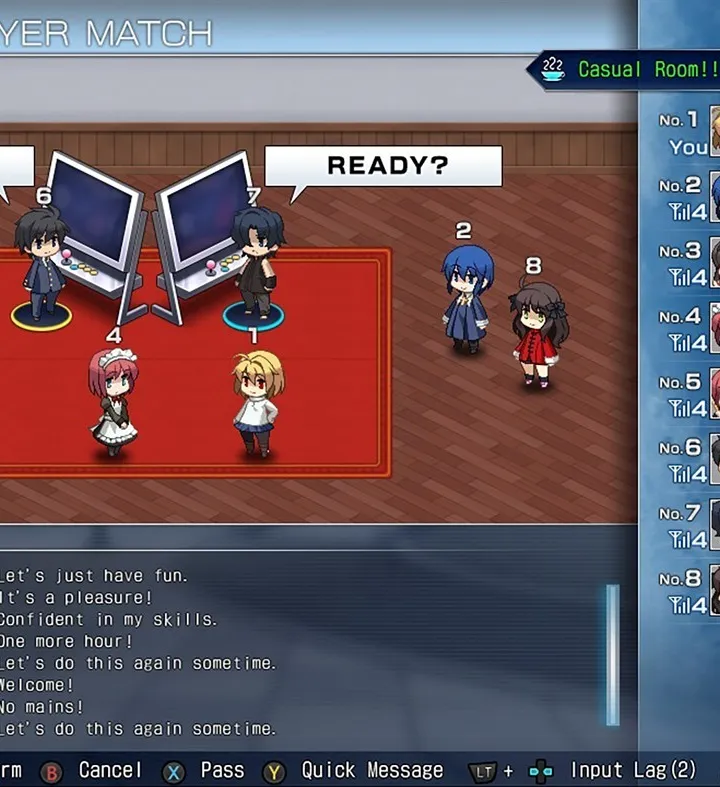
- Player Match: Create or join custom lobbies for casual play with friends or other players.
- Replay Theater: Watch replays of your own matches or top-ranked players.
- Rankings: View global and character-specific leaderboards.
For the best experience, ensure your internet connection is stable. A wired Ethernet connection is highly recommended over Wi-Fi to minimize input lag and connection drops, which can severely impact your performance in a fast-paced fighting game like Melty Blood: Type Lumina.
Ranked Match: Climbing the Ladder
The Ranked Match mode is the heart of competitive play. Your performance here directly impacts your global ranking and matchmaking. Here’s a breakdown of how it works and strategies to succeed:
Understanding the Ranking System
Melty Blood: Type Lumina utilizes a tiered ranking system. You start at a lower rank (e.g., "D-Rank") and progress through various tiers by winning matches. Losing matches can cause you to lose points and potentially even demote you to a lower rank. The system aims to match you with opponents of similar skill levels, ensuring fair and challenging encounters.
- Rank Tiers: While specific names may vary with updates, expect tiers like D, C, B, A, S, and potentially higher, often with sub-divisions (e.g., A+, A, A-).
- Matchmaking: The game prioritizes matching you with players within a close proximity to your current rank. This might lead to slightly longer queue times at very high or very low ranks.
- Rank Points: Winning awards you rank points, while losing deducts them. The amount gained or lost depends on your opponent's rank relative to yours. Defeating a higher-ranked opponent yields more points, and vice-versa.
Pre-Match Preparation
Before queuing for Ranked, consider these steps:
- Character Selection: While you can change characters between matches, it's wise to have a primary character you're comfortable with. Spend time in "Training Mode" practicing your combos, pressure strings, and defensive options.
- Connection Check: The game often displays a connection quality indicator (e.g., "Ping" or "Rollback Frames") before a match. It's generally advisable to decline matches with consistently high ping or unstable connections to avoid a frustrating experience.
- Match Settings: Ensure your preferred character is set. You can usually access this from the character select screen within the online lobby or through the "Options" menu.
In-Match Strategies for Ranked Success
- Adaptability is Key: Don't stick to one game plan. Observe your opponent's tendencies. Are they jump-happy? Do they block a lot? Do they rely on specific Moon Skills? Adjust your offense and defense accordingly.
- Defense Wins Games: Mastering your defensive options is crucial. Learn to utilize Shield effectively against pressure, understand when to use Moon Drive for a burst of defense or offense, and practice your Throw Escape timing.
- Resource Management: Pay attention to your Moon Gauge and Magic Circuit. Knowing when to spend these resources on Moon Skills, Moon Drive, or Arc Drive/Last Arc can turn the tide of a match. Don't waste them recklessly.
- Punish Opportunities: Every character has moves that are unsafe on block. Learn the common unsafe moves of popular characters and practice punishing them in Training Mode. A successful punish can lead to significant damage.
- Mental Fortitude: Ranked play can be stressful. Don't get discouraged by losses. Analyze what went wrong, take a short break if needed, and come back with a fresh mindset. Learning from your mistakes is the fastest way to improve.
Player Match: Casual Play and Practice
Player Match offers a more relaxed environment for playing online. It's an excellent place to:
- Practice New Characters: Experiment with characters you're less familiar with without the pressure of losing rank points.
- Play with Friends: Create private lobbies and invite your friends for casual sets.
- Test Strategies: Try out new combos or defensive setups against real opponents before taking them to Ranked.
- Spectate Matches: Many lobbies allow spectators, offering a great way to learn from other players.
To create a Player Match lobby, select "Player Match" from the Network Mode menu, then choose "Create Room." You can set various options, including the number of players, match rules, and a password for private rooms. To join an existing lobby, select "Search Room" and filter by region, connection quality, or specific room names.
Replay Theater & Rankings
- Replay Theater: Regularly review your own replays, especially losses. Identify where you made mistakes, missed punishes, or fell victim to predictable patterns. You can also watch replays of top-ranked players to learn advanced techniques and character matchups.
- Rankings: Check the global and character-specific rankings to see where you stand and who the top players are. This can be a source of motivation and a way to identify players whose replays you might want to watch.
100% Human-Written. AI Fact-Checked. Community Verified. Learn how AntMag verifies content