
The HUD (Heads-Up Display) provides vital information during missions. Familiarize yourself with its components:
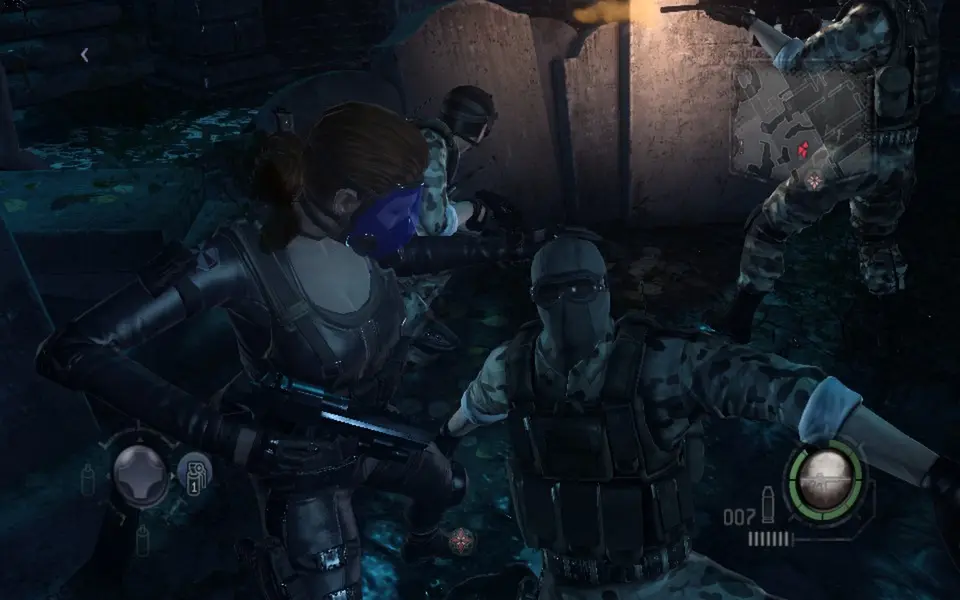
- Health Bar (Top Left): Displays your current health. When critically low, it will flash red. Use health items immediately.
- Ammo Count (Bottom Right): Shows your current magazine capacity and total reserve ammunition for your equipped weapon.
- Grenade/Secondary Item Slot (Bottom Left): Indicates your currently selected grenade or secondary item and its quantity.
- Special Ability Gauge (Below Health Bar): Fills up as you deal damage or perform specific actions. Once full, you can activate your character's unique special ability.
- Mini-Map (Top Right): Shows your immediate surroundings, objectives, and enemy locations (if detected). Pay attention to red dots indicating hostile presence.
- Team Health/Status (Left Side): Displays the health and status of your AI or co-op teammates.
- Objective Tracker (Top Center): Keeps track of your current mission objective.
Keeping an eye on your HUD is essential for situational awareness. Don't get so focused on shooting that you forget to check your health or ammo. The mini-map is particularly useful for planning your next move and avoiding ambushes.
Compare user interface (ui) explained inResident Evil 2 (1998)