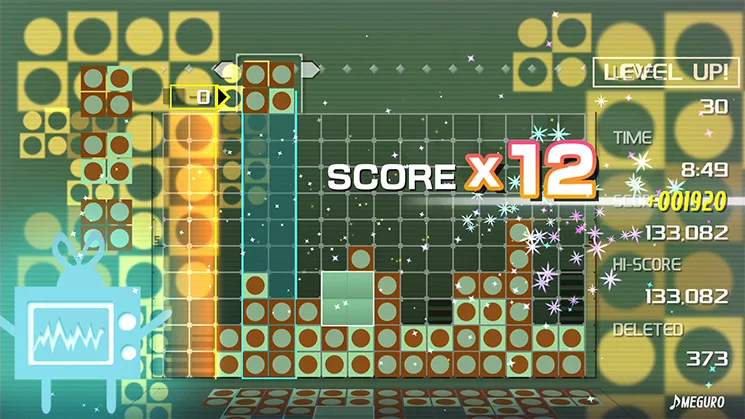
The Lumines Remastered user interface is clean and informative, providing all the necessary details without cluttering the screen. Familiarizing yourself with these elements will help you track your progress and strategize effectively.
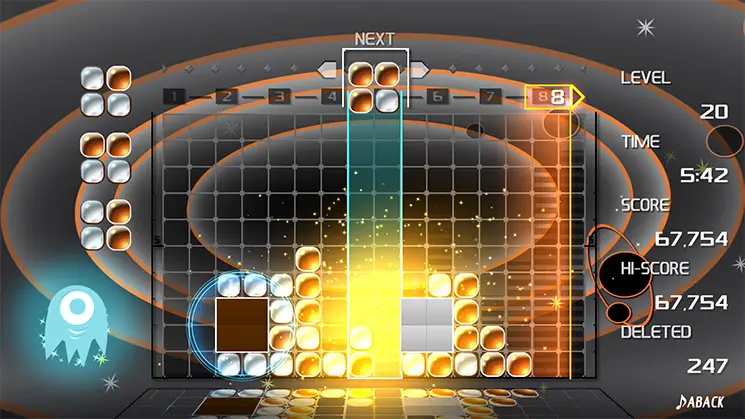
- Playing Field: The central area where blocks fall and clear. This is your main focus during gameplay.
- Next Block Display: Located usually in the top-right or top-left corner, this shows you the next block that will fall. Always keep an eye on this to plan your moves ahead.
- Score: Your current score, typically displayed prominently at the top of the screen. Higher scores are achieved by clearing larger groups of blocks and creating chain reactions.
- Chain Counter: Shows how many consecutive clears you've achieved. Chains are crucial for maximizing your score.
- Time Line: The vertical bar that sweeps across the screen, clearing 2x2 squares of the same color. Its speed changes with each skin. Understanding its rhythm is key to successful play.
- Skin Name / BPM: Displays the current skin (level) and its beats per minute (BPM), which often dictates the Timeline's speed.
- Game Over Line: A horizontal line at the top of the playing field. If blocks stack above this line, the game ends.
Paying attention to the Next Block and the Timeline's position will significantly improve your gameplay.