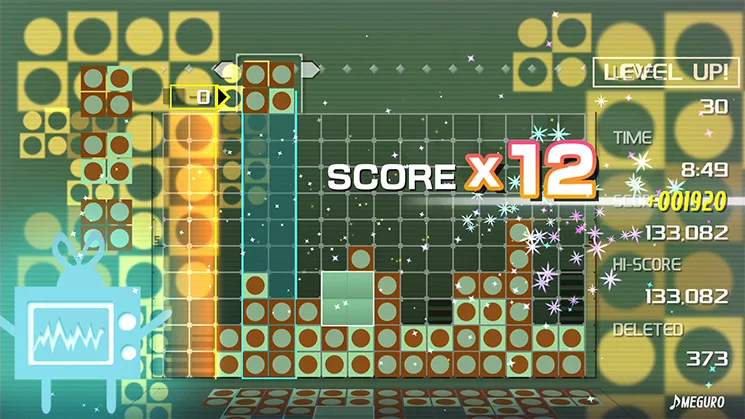
Visual Cues and Indicators
Mastering Lumines Remastered goes beyond just matching blocks; it involves a keen understanding of the game's visual language. The game provides numerous subtle and overt cues that, when recognized, can significantly improve your strategic play and score.
The Timeline Scan Line
The most crucial visual indicator is the Timeline Scan Line. This vertical line continuously sweeps across the playfield from left to right, clearing any completed 2x2 (or larger) squares of the same color. Pay close attention to its position and speed:
- Speed Variation: The Timeline's speed changes with each new skin (level) you encounter. Faster skins mean less time to arrange blocks, demanding quicker decisions. Slower skins offer more breathing room for complex arrangements.
- Clearing Blocks: Blocks are only cleared when the Timeline passes over a completed square. This means you can form a square, but it won't disappear until the line reaches it. Use this to your advantage by creating multiple squares in the Timeline's path for a chain reaction.
- Anticipation: Always be aware of where the Timeline is. If it's approaching a column quickly, prioritize clearing blocks in that column to prevent the stack from reaching the top. Conversely, if it's far away, you have more time to set up larger combos.
Block Colors and Patterns
While seemingly straightforward, the colors and patterns of the falling blocks offer important information:
- Current Block: The block currently falling is always displayed at the top of the screen. This allows you to plan your next move before the block even enters the playfield.
- Next Block Preview: In most game modes, a small preview of the next block is shown just above the playfield, usually to the left or right of where the current block is displayed. This is invaluable for planning multi-step strategies. For example, if you see a block with two light squares coming next, you can position your current block to set up a quick 2x2 clear.
- Skin-Specific Colors: Each skin features a unique color palette for the two block types. While the core gameplay remains the same, some color combinations can be more visually distinct than others. If you find a particular skin's colors difficult to differentiate, consider adjusting your display settings or practicing with that skin to acclimate.
Score and Combo Indicators
The game provides clear feedback on your scoring and combo performance:
- Cleared Block Animation: When a 2x2 square is cleared by the Timeline, the blocks will flash and disappear with a satisfying visual effect. This confirms your successful clear.
- Combo Multiplier Text: If you clear multiple 2x2 squares with a single pass of the Timeline, a "COMBO" indicator will appear, often accompanied by a numerical multiplier (e.g., "x2", "x3"). The higher the multiplier, the more points you earn.
- Score Pop-ups: As blocks are cleared and combos are achieved, numerical score values will briefly pop up from the cleared area. These numbers indicate the points gained from that specific action.
- Total Score Display: Your current total score is prominently displayed, usually at the top or bottom of the screen. Keep an eye on this to track your progress and aim for high scores.
Game State Warnings
As the playfield fills up, the game will provide visual warnings to indicate impending danger:
- Flashing Blocks: When blocks in a column get dangerously close to the top of the playfield, they will begin to flash. This is your immediate warning to clear blocks in that column as quickly as possible.
- "GAME OVER" Overlay: If any column reaches the very top of the playfield, a "GAME OVER" overlay will appear, and the game will end. This is the ultimate visual cue that you've run out of space.
By actively observing and interpreting these visual cues, you can make more informed decisions, react faster to changing game states, and ultimately achieve higher scores and longer play sessions in Lumines Remastered.