Get answers to your Just Dance 2024 Edition questions. Learn about perfect scoring, unlocking content and navigating groovy gameplay with this helpful FAQ.
Welcome, superstar! Got questions about hitting those perfect moves or unlocking all the groovy content in Just Dance 2024 Edition? You've come to the right place! This FAQ is designed to help both new and returning dancers navigate the game with ease, ensuring you get the most out of every jam session.
General Gameplay & Scoring
How do I get a "Perfect" score?
Achieving a "Perfect" score requires precise timing and mirroring the on-screen coach's moves as closely as possible. Here's how to maximize your chances:
- Study the Choreography: Before a song, watch the coach's movements during the intro or even in practice mode (if available for that track). Pay attention to the flow and transitions.
- Follow the Pictograms: The pictograms that scroll from right to left at the bottom of the screen are your primary guide. Execute the move exactly as the pictogram enters the designated "hit zone" in the center.
- Controller Grip: Ensure your Joy-Con (Nintendo Switch), PlayStation Move Controller (PlayStation), or Xbox Kinect (Xbox One) is held firmly and correctly. For Joy-Cons, make sure the wrist strap is securely fastened.
- Practice, Practice, Practice: Some moves are trickier than others. Don't be afraid to replay your favorite songs or challenging sections to perfect your technique.
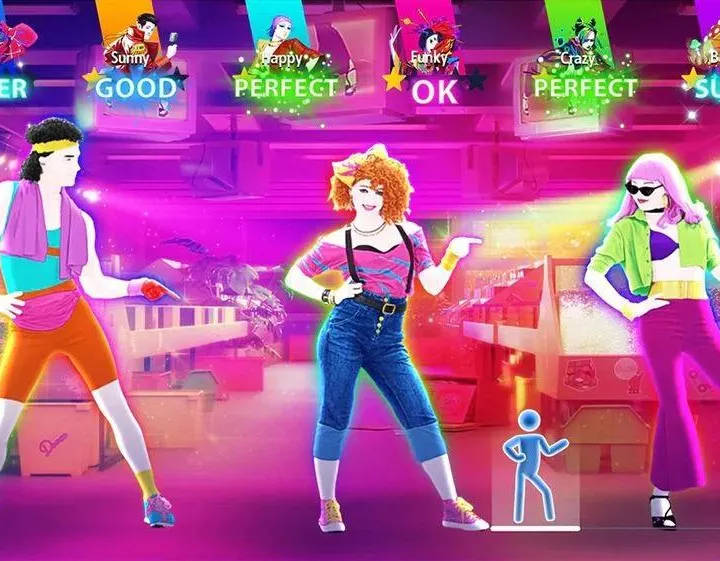
What do the different score ratings mean (OK, GOOD, SUPER, PERFECT)?
These ratings indicate how accurately you performed a move:
- X (Miss): You didn't register a move or were completely off.
- OK: You were in the ballpark, but not quite on time or accurate enough.
- GOOD: A decent attempt! You were close to the correct timing and movement.
- SUPER: Excellent! You nailed the move with good timing and accuracy.
- PERFECT: You hit the move with impeccable timing and precision. This is what you're aiming for to get the highest scores and unlock "Megastar" status.
How do I unlock new songs and content?
Just Dance 2024 Edition offers several ways to expand your song library and customize your experience:
- Leveling Up: As you play songs and earn stars, you'll gain XP and level up. Many new songs, avatars, and emotes are unlocked automatically as you reach certain player levels. Check the "Progression" tab in your Dancer Card to see what's coming next.
- Just Dance+ Subscription: This premium subscription service grants you access to an ever-growing catalog of over 300 songs from previous Just Dance titles and exclusive new tracks. You can find details on subscribing within the game's main menu under the "Just Dance+" section.
- Seasonal Events: Keep an eye out for limited-time seasonal events. Participating in these events often rewards you with exclusive songs, outfits, and other cosmetic items. Navigate to the "Events" section from the main menu to see current and upcoming events.
- Gift Machine: Use your earned "Mojo" coins in the Gift Machine (accessible from the main menu) for a chance to unlock new avatars, backgrounds, and emotes. While it doesn't unlock full songs, it's a great way to personalize your Dancer Card.
Multiplayer & Online Features
How do I play with friends locally?
Local multiplayer is a core part of the Just Dance experience! Here's how to set it up:
- From the main menu, select "Dance."
- Choose your desired song.
- Before starting the song, you'll see a screen showing the connected controllers. Each player needs their own compatible controller (e.g., a Joy-Con for Switch, a smartphone with the Just Dance Controller app).
- Ensure all players have selected their unique Dancer Card profile.
- Once all players are ready, select "Start Dance" to begin your group performance!
Can I play Just Dance 2024 Edition online with friends?
Absolutely! The game features online multiplayer through the "Worldwide Dance Floor."
- From the main menu, select "Worldwide Dance Floor."
- You can choose to join a public room or create a private room to invite your friends.
- To join a public room: Simply select "Join Public Room" and the game will match you with other players.
- To create a private room: Select "Create Private Room." You'll be given a unique room code. Share this code with your friends, and they can enter it to join your private session.
- Once in a room, you and your friends can vote on songs and dance together, competing for the highest scores.
What is the Just Dance Controller app and how do I use it?
The Just Dance Controller app turns your smartphone into a motion controller, allowing you to play without needing a dedicated console controller. This is especially useful for larger groups!
- Download the App: Search for "Just Dance Controller" in your device's app store (available on iOS and Android).
- Connect to Wi-Fi: Ensure your smartphone and your gaming console (Nintendo Switch, PlayStation 5, Xbox Series X|S) are connected to the same Wi-Fi network. This is crucial for the app to detect your game.
- Launch the Game: Start Just Dance 2024 Edition on your console.
- Open the App: Open the Just Dance Controller app on your smartphone. It should automatically detect your game.
- Select Your Profile: In the app, select the profile you wish to use.
- Hold Your Phone: Hold your phone securely in your right hand, following the on-screen instructions. Now you're ready to dance!
Troubleshooting & Settings
My controller isn't connecting. What should I do?
If you're having trouble with controller connection, try these steps:
- Check Batteries: Ensure your Joy-Cons or PlayStation Move controllers have sufficient battery life.
- Re-sync Controller: For Joy-Cons, press the small sync button on the side. For PlayStation Move, ensure it's paired correctly via the console's Bluetooth settings.
- Restart Console: A full restart of your console can often resolve connectivity issues.
- Check Just Dance Controller App: If using the app, confirm both your phone and console are on the same Wi-Fi network. Also, try restarting the app.
- Interference: Ensure there are no strong wireless signals or physical obstructions between your controller and the console.
How do I adjust the difficulty or turn on sweat mode?
Just Dance 2024 Edition automatically adjusts difficulty based on the song's choreography. There isn't a manual difficulty setting in the traditional sense. However, you can track your workout and calorie burn with "Sweat Mode":
- From the main menu, navigate to your "Dancer Card" (usually found in the top left corner of the screen).
- Look for the "Settings" or "Preferences" option within your Dancer Card.
- You should find an option to toggle "Sweat Mode" on or off. When activated, the game will display estimated calorie burn and track your workout duration during songs.
Can I customize my dancer's appearance?
Yes! Personalizing your Dancer Card is a fun way to express yourself.
- From the main menu, select your "Dancer Card" (usually represented by your avatar in the top left).
- Here you'll find options to customize various elements:
- Avatar: Change your profile picture. New avatars are unlocked through leveling up, the Gift Machine, or seasonal events.
- Background: Select a unique background for your Dancer Card.
- Alias: Choose from several pre-set titles to display under your name.
- Emotes: Equip different emotes that can be used in the Worldwide Dance Floor.
- Browse your unlocked items and select your favorites to create a unique look!
Still have questions? Don't hesitate to check the in-game help section or visit the official Just Dance website for more support!
100% Human-Written. AI Fact-Checked. Community Verified. Learn how AntMag verifies content