Learn the essential controls for Elite Dangerous. Understand pitch, yaw, and roll, and discover how to optimize your ship's handling for combat and navigation.
If your initial reaction to controlling your ship is that you might have just wasted 100 quid (bucks) on the premise you'll never last long enough to turn a profit thereby having a considerably poor gaming experience at the hands of greedy NPC pirates and just plain nasty ego deprived human players (more of which I'll explain later), never fear, your probably just used to up being down and down being up, i.e. inverted control systems.
The default control configuration for E:D is that when you push the mouse forward your ship will pitch back (nose up) and therefore your ship will roll forward (nose down) when you pull the mouse back. For many of us we are used to flying both terrestrial and cosmic vehicles with the axis inverted so when we pull back on the mouse our ship equally pitches back and therefore we fly 'up' and vice versa when you move your mouse forward (although technically in space there is no up or down).
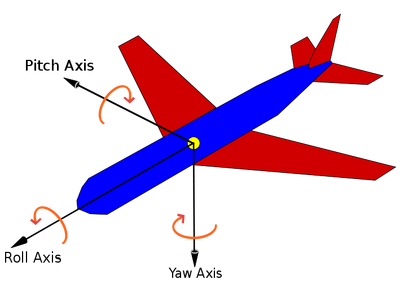
If like me you don't know your Pitch from your Yaw here's a handy little diagram I dug out from Wikipedia:
100% Human-Written. AI Fact-Checked. Community Verified. Learn how AntMag verifies content