
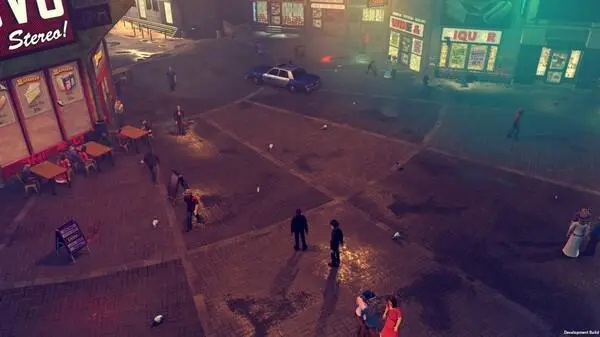
Master The Precinct's gameplay basics. Learn essential actions, interactions, and movement strategies for a successful law enforcement career.
Welcome to The Precinct, rookie! Before you hit the streets of Vice City, understanding the core mechanics is crucial for a successful career in law enforcement. This section will walk you through the essential actions, interactions, and strategies you'll need to master.
Movement and Interaction
Your patrol officer is agile and resourceful. Mastering movement and interaction is the first step to effective policing.
- Walking/Running: Use the Left Analog Stick (L-Stick on Xbox, PS-Stick on PlayStation, WASD on PC) to move your character. Pressing the Left Stick (L3 on PlayStation, LS on Xbox, Left Shift on PC) will initiate a sprint, allowing you to quickly cover ground or chase suspects. Be mindful of your stamina bar, as prolonged sprinting will deplete it.
- Interacting with Objects: The 'Interact' button (A on Xbox, X on PlayStation, E on PC) is your primary tool for interacting with the environment. This includes opening doors, picking up evidence, talking to NPCs, and accessing computer terminals. A prompt will usually appear on-screen when an interaction is possible.
- Climbing/Vaulting: To overcome obstacles like low walls or fences, approach them and press the 'Vault' button (B on Xbox, Circle on PlayStation, Spacebar on PC). For higher ledges, look for climbable surfaces – these are often highlighted with a subtle visual cue. Press 'Interact' to initiate a climb.
- Entering Vehicles: Approach any police vehicle or civilian car and press 'Interact' to enter. If it's a police vehicle, you'll automatically assume the driver's seat. For civilian cars, you may need to 'Hotwire' it first, which involves a quick mini-game (see 'Vehicle Mechanics' below).
Investigation and Evidence Collection
A good detective leaves no stone unturned. Thorough investigation is key to solving cases and bringing criminals to justice.
- Scanning the Scene: Upon arriving at a crime scene, activate your 'Detective Vision' (Left Bumper on Xbox, L1 on PlayStation, Q on PC). This highlights interactive objects, evidence, and potential clues in the environment. Pay close attention to glowing outlines.
- Collecting Evidence: When an item is highlighted in Detective Vision, approach it and press 'Interact' to collect it. Common evidence types include:
- Spent Shell Casings: Often found near gunfights.
- Fingerprints: Requires a 'Fingerprint Dusting Kit' (found in your squad car's trunk) to collect from smooth surfaces.
- Blood Samples: Requires a 'Forensic Kit' (also in your squad car) to collect.
- Witness Statements: Approach NPCs with a speech bubble icon above their heads and press 'Interact' to interview them.
- Analyzing Evidence: Once collected, evidence can be analyzed back at the Precinct's Forensics Lab. Access the lab computer and select the 'Evidence Analysis' option. This process takes time, so plan your investigations accordingly.
Combat and Apprehension
Sometimes, talking isn't enough. When force is necessary, ensure you're prepared and follow protocol.
- Weapon Selection: Use the D-Pad (Xbox/PlayStation) or number keys (PC) to cycle through your available weapons. Your standard loadout includes a 'Service Pistol', 'Taser', and 'Baton'. More specialized weapons like the 'Shotgun' or 'Assault Rifle' can be acquired from the armory after certain mission progressions.
- Aiming and Firing: Hold the 'Aim' button (Left Trigger on Xbox, L2 on PlayStation, Right Mouse Button on PC) to enter aiming mode. The reticle will appear, indicating your target. Press the 'Fire' button (Right Trigger on Xbox, R2 on PlayStation, Left Mouse Button on PC) to discharge your weapon. Remember, lethal force should be a last resort.
- Non-Lethal Takedowns: For apprehending suspects without lethal force, equip your 'Taser'. Aim and fire to temporarily incapacitate them. Alternatively, approach a suspect from behind and press the 'Takedown' button (Y on Xbox, Triangle on PlayStation, F on PC) for a non-lethal arrest.
- Cover System: To avoid incoming fire, press the 'Cover' button (Right Bumper on Xbox, R1 on PlayStation, C on PC) when near a suitable object (walls, cars, crates). You can peek out from cover to fire and then snap back to safety.
Vehicle Mechanics
Patrolling Vice City requires a reliable set of wheels. Understanding vehicle controls is essential.
- Driving: Use the Left Analog Stick (Xbox/PlayStation) or WASD (PC) to steer. The Right Trigger (Xbox), R2 (PlayStation), or W (PC) accelerates, while the Left Trigger (Xbox), L2 (PlayStation), or S (PC) brakes/reverses.
- Siren and Lights: Activate your police siren and emergency lights by pressing the 'Siren' button (Click Left Stick on Xbox, L3 on PlayStation, G on PC). This will alert other drivers and pedestrians to your presence and can help clear traffic.
- Vehicle Combat: When engaged in a high-speed chase, you can lean out of your window to fire your sidearm by holding the 'Aim' button while driving. Be cautious, as this leaves you vulnerable.
- Hotwiring: For civilian vehicles, a quick mini-game will initiate upon entering. Follow the on-screen prompts to successfully hotwire the car. Failing the mini-game will alert nearby NPCs and potentially attract unwanted attention.
The Precinct Hub
Your home base is more than just a building; it's a vital resource for your career.
- Briefing Room: Access new missions and receive critical information from your commanding officer. Look for the glowing dossier on the central table.
- Forensics Lab: As mentioned, this is where you analyze collected evidence. The computer terminal is always accessible.
- Armory: Resupply your ammunition and acquire new weapons or gear after unlocking them through mission progression. The armory is located on the ground floor, past the main desk.
- Locker Room: Change your uniform or access personal items. This is also where you can review your career statistics and achievements.
100% Human-Written. AI Fact-Checked. Community Verified. Learn how AntMag verifies content