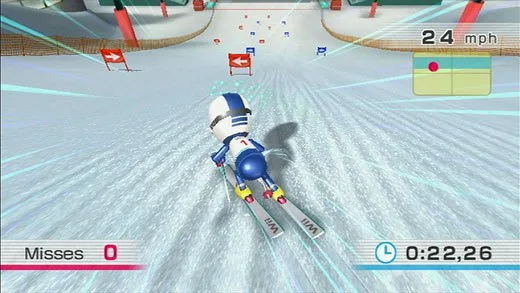
New to Wii Fit? This beginner's guide covers everything you need to know, from setting up your profile and understanding the Balance Board to your first Body Test and training options.
Hey there! So you've just picked up Wii Fit and are wondering where to start? No worries, I've got your back. This guide is designed to walk you through everything you need to know to get the most out of your Wii Fit experience, right from the get-go. We'll cover setting up your profile, understanding the Balance Board, and what to expect during your first Body Test and training sessions. Let's get you moving!
Wii Fit, developed by Nintendo and Touch! Generations, is all about getting you in shape. It officially hit American shelves on May 21, 2008, and the star of the show is the Wii Balance Board – you absolutely can't play without it. This board is pretty sturdy, capable of handling up to 330 lbs, but remember, never jump on it. It's designed for standing and balancing, not for acrobatics!
Before we dive into the fun stuff, let's quickly go over the essentials you'll need:
- 2 Wii Remotes (one if you're playing solo, two for 2-player modes)
- 1 Nunchuk
- 1 Wii Balance Board
- Your Wii console and the Wii Fit game itself
You'll use the Wii Remote for navigating menus and selecting activities, sometimes with the directional pad or pointer. Some exercises even incorporate the Wii Remote or the Nunchuk. But the Balance Board? That's your main partner for most of the activities.
Getting Started: Your First Steps
When you first boot up Wii Fit, you might need to run a quick Wii System Update. Once that's done, it's time to create your profile! You'll select your Mii, and then the Wii Balance Board will introduce itself. Pay attention to its tips on posture. You'll then enter your personal details like age and height. After that, get ready for your very first Body Test – we'll cover that in more detail soon. Oh, and you can add a password to your profile for privacy.
Navigating the Wii Fit Menu
The main menu is your central hub. You'll see any Miis you've created profiles for standing at the bottom, sometimes doing little animations. Above them is your graph, showing your Body Mass Index (BMI) and Fit Credits. To the left, you have:
- Wii Menu: Takes you back to the main Wii system menu.
- New Profile: Lets you create profiles for up to eight different Miis.
On the right side, you'll find:
- Settings: Here you can install the Wii Fit Channel (which lets you do a Body Test without the game disc in, but you'll need the disc for training!), perform a Wii Balance Board check, and view the Credits.
- Trial: Allows you to use Guest Miis for a Body Test or some training activities.
Your Profile Deep Dive
Selecting your Mii takes you to Your Profile. This is where you'll see your calendar and track your progress. To the right of the calendar, you have:
- Wii Fit Plaza: Returns you to the main menu.
- Graph: Shows your history for BMI, weight, Wii Fit Age, and Fit Credits.
On the left, under User Settings, you can:
- Edit Profile: Change your Mii, height, birthday, or password.
- Change Design: Customize your calendar color and Stamp Design.
- Change Trainer: Switch between the male and female trainers.
- Delete User Data: Erase your entire profile if needed.
Below the graph, you'll find the options to jump into a Body Test or start Training.
The All-Important Body Test
This is where Wii Fit gets personal! The Body Test measures your weight, BMI, and center of balance. BMI is a calculation based on your height and weight to categorize you as Underweight, Normal, Overweight, or Obese.
Before you step on the board, you'll be asked about your clothing weight. Choose 'Light' for minimal clothing, 'Heavy' for jeans and a hoodie, or 'Other' if you're unsure or, well, naked. Then, step onto the Balance Board and stand as still as possible. Sometimes, you'll be asked to close your eyes. Try to relax and review your results.
First up is your center of balance. You'll see a red dot representing your weight distribution. The goal is to keep it perfectly centered within a target area. If it's off, the game will give you tips on improving your posture. Good balance? Awesome!
Next is your BMI. Aim for that sweet spot in the 'Normal' range. Finally, check the scale to see your current weight and track any changes.
Your graph will then update with this new data. After the main measurements, you'll do two balance tests to determine your Wii Fit Age. There are five balance tests in total, and you'll do two each time:
- Basic Balance Test: Stand with feet apart and balance left and right to keep a red bar within a blue area for three seconds. You have 30 seconds to complete five levels.
- Walking Test: Stand with feet equally spread and walk in place for 20 steps, swinging your arms slightly for balance.
- Agility Test: Shift your weight to the front, left, back, and right to guide a dot and hit blue boxes.
- Single-Leg Balance Test: Stand on one leg and try to maintain balance. The target area on the graph narrows over time. If your dot goes outside, you're done.
- Steadiness Test: Stand as still as possible for 30 seconds. Don't worry about following any on-screen boxes here.
Your Wii Fit Age is calculated from these tests. The goal is to have a Wii Fit Age that's the same as or lower than your actual age. If you do more than one Body Test in a day, the game will ask if you want to save the latest results.
Diving into Training
The Training menu is where the real workout begins! You'll see your Fit Credits balance on the left – these are earned by spending time playing Wii Fit and unlock more activities. The bank shows both 'Today's Time' and 'Total Time'. To the right, you can choose from Yoga, Strength Training, Aerobics, and Balance Games.
Remember, you can choose either a Male or Female trainer to guide you through the exercises.
During many exercises, you'll encounter visual aids:
- A yellow circle with a red dot: Keep the red dot inside the yellow circle by moving your body.
- A bar with a blue area: Try to keep your weight centered within the blue zone.
- A graph: A red line will move based on your Wii Remote's position; keep it in the middle.
- In some balance games, a blue area on a graph: Keep your red dot within this area to perform better.
After Yoga and Strength Training sessions, you'll get a grade based on your center of balance and earn stars:
- 0-49 pts. = 1 star
- 49-69 pts. = 2 stars
- 70-89 pts. = 3 stars
- 90-100 pts. = 4 stars
Aerobics and Balance Games are scored differently, often by points earned or time taken.
Keep an eye out for new exercises you can unlock, and for existing ones, you can often increase repetitions, extend time limits, or tackle harder difficulty levels. We'll touch more on these unlockables later!
100% Human-Written. AI Fact-Checked. Community Verified. Learn how AntMag verifies content