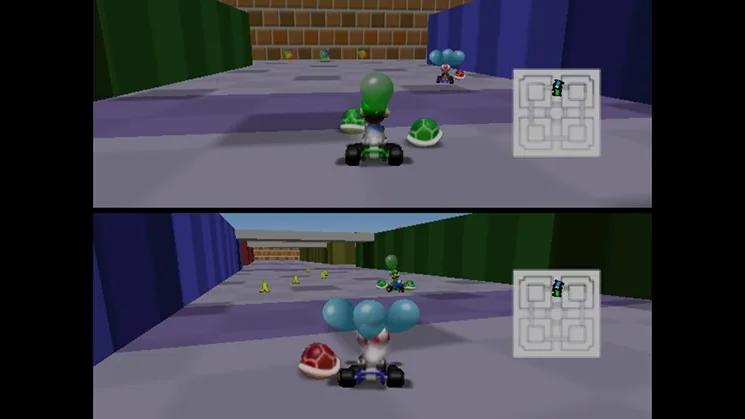
Learn how to master Mario Kart 64 controls! Discover power-sliding, mini-boosts, rocket starts, and how to recover from banana peels to dominate the track.
Alright, so you've picked up Mario Kart 64, huh? Awesome! It's a blast, but like any good game, there are some tricks to really get the most out of it. Don't worry, it's not super complicated, but knowing these moves will make you way faster and harder to beat. Think of me as your co-pilot here, showing you the ropes.
Let's break down how to actually drive like a pro. It's all about mastering a few key techniques that'll have you leaving your friends in the dust.
Basic Controls
First off, the essentials. These are the buttons you'll be mashing the most:
- Control Stick: This is your steering wheel. Just tilt it where you want to go. It's also how you navigate menus, so get comfy with it.
- A Button: This is your gas pedal. Hold it down to go, let off to slow down. You'll also use it to select things in menus.
- B Button: Tap this to brake and slow down. If you're stopped, holding B and tilting the stick down lets you reverse – super handy when you get stuck against a wall, especially if you're playing as a lighter character. It's also your 'back' button in menus.
- R Button: This one's got a few tricks! A quick tap lets you hop, which can be useful for clearing small bumps. But its real power is in power-sliding and getting mini-boosts, which we'll get to in a sec.
- L Button: This just lowers the music volume or mutes it. Might help on some tracks if the tunes are distracting, but I usually keep it cranked!
- Z Button: This is how you use your items. You can aim them too! Hold Z and tilt the stick up to throw forward, or down to throw backward. If you've got something like a shell, holding Z will keep it trailing behind you, ready for a perfect moment.
- C Up: This changes your camera view. Zooming in or out can seriously help your visibility, especially on tricky uphill sections.
- C Right: This swaps your view to show your speedometer. Good to know how fast you're *actually* going, especially if you're trying to hit those speed boosts.
Advanced Controls
Okay, now for the stuff that separates the rookies from the pros. These are the techniques that will really shave seconds off your lap times.
Power-Sliding
This is HUGE. Seriously, you *need* to get good at this. When you're turning, press and hold the R button. Then, steer into the turn. You'll start a 'power-slide.' The best part? You barely lose any speed, especially if you're a heavier character. It makes taking sharp corners way smoother. Just be careful, because while sliding, you're a bit less mobile and might hit obstacles like banana peels more easily. But trust me, the speed you save is worth it.
Mini-Boost
Power-sliding isn't just for turning; it's also the key to getting a mini-boost! Here's how it works: Start a power-slide (you'll see white smoke from your engine). Now, here's the tricky part: while sliding, quickly flick the control stick in the *opposite* direction of your turn, then immediately flick it back in the direction of the turn. You need to be holding the A and R buttons through this. If you do it right, you'll see yellow smoke, then eventually red smoke from your engine. When the smoke turns red, release the R button, and BAM! You get a little burst of speed. It's not a game-changer like a Mushroom, but it's super helpful on wide turns and can give you that edge.
Oh, and a little bonus: if you're driving right alongside another racer, you might get a small speed boost from a puff of smoke. It's great for trying to overtake someone.
Rocket Start
This is all about the very beginning of the race. When Lakitu shows the lights (red, red, green, GO!), you want to hit the A button right as the third light turns blue, or just after the second one fades. Nail it, and you'll get a 'Rocket Start,' launching off the line at full speed. If you get the timing *perfect*, right after the second red light disappears, you'll even get a boost similar to half a Mushroom! Mess it up, though, and you'll just spin out. This also works if you fall off and Lakitu drops you back on the track – hit A as you land for a quick takeoff.
The Spin-Turn
This is another way to turn, but it's more about rotating your kart. Press and hold both A and B at the same time, and your kart will start to spin. If you then release B, you'll drive forward out of the spin. It's not my favorite for general turning, but it can be useful for quickly straightening out after a slide or lining yourself up perfectly to hit someone with a shell.
Banana Peel Recovery
Everyone hates hitting banana peels, right? You slide out of control, lose precious time. But here's a pro tip: if you hit a banana peel, immediately press the B button. If you time it right, you'll avoid spinning out! You'll see a little music note pop up above your character as confirmation. It's a lifesaver!
That's the core of it! Mastering these controls, especially the power-slide and mini-boost, will make a massive difference. Now, let's talk about items...
100% Human-Written. AI Fact-Checked. Community Verified. Learn how AntMag verifies content