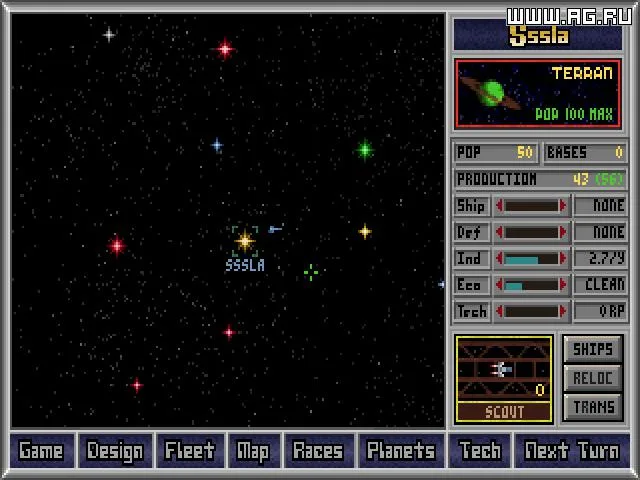
Welcome, Commander! Master of Orion is the definitive 4X sci-fi strategy experience, where you'll guide a fledgling spacefaring civilization from its first starship to galactic domination. You'll manage your empire's economy, research new technologies, design powerful warships, and navigate the complex political landscape of the galaxy. It's a deep, rewarding game for anyone who loves grand strategy and building an interstellar empire.
This guide is your essential companion to conquering the stars. We'll cover everything you need to know, from optimizing your early expansion and managing resources to mastering advanced ship design and achieving ultimate victory. Whether you're aiming for a diplomatic triumph, a military conquest, or a technological singularity, this guide will help you navigate the anomalies and challenges of the galaxy and secure your place among the stars.
1. What is MOO?
Dive into Master of Orion! Learn about interstellar exploration, conquest, diplomacy, and technology. Master the complexities of this deep strategy game.
Alright, let's get you started with Master of Orion (MOO). Think of it as a grand space opera where you're in charge of an entire civilization. You kick things off with just one lonely planet, a handful of ships, and a dream. Your mission? To explore the vastness of the galaxy, build up your industries, find new worlds to colonize, research mind-bending technologies, and maybe even chat with (or conquer) other alien races.
The ultimate goal is to become the supreme ruler of the galaxy, either by getting elected Emperor or by simply blowing everyone else out of the water with your military might. It's a deep, complex game, and that's exactly what makes it so addictive.
Now, what MOO *isn't* is a fast-paced arcade shooter. You can take your sweet time with every decision – no need to worry about quick reflexes here. While there's ship-to-ship combat, it's not the main event. You can even auto-resolve battles if you're not in the mood, letting the game handle the dogfights. If you're looking for a hardcore tactical combat experience, you might want to check out something like 'Rules of Engagement 2' instead.
MOO really shines in its replayability. You've got 10 distinct alien races to choose from, each with their own quirks and strengths. The Alkari, for example, are bird-like folks who excel at piloting and propulsion tech, while the Darloks are master spies, great for stirring up trouble or stealing secrets. Plus, every new game throws a randomly generated galaxy at you. Finding an artifact world early on can give you a massive research boost, for instance. You also get to tweak the galaxy size and the number of opponents, and the difficulty setting influences how fast new tech pops up. It all adds up to a fresh experience every time you play.
Just a heads-up, games can be a marathon, not a sprint. My first playthrough took about 16 hours, though a typical game usually wraps up in 4-6 hours. Because it's so rich and complex, it can feel a bit daunting when you're first learning. This guide is here to help smooth out that learning curve, but hopefully, even seasoned veterans will find some useful nuggets of wisdom within.
2. Frequently asked questions
Find answers to common questions about Master of Orion, including speech, map controls, difficulty levels, council meetings, ship icons, ship design power, and system requirements.
Q: Is there any speech in the game?
A: No, there is no speech. The speech component of some soundcards is used for special effects, not for spoken dialogue.
Q: How do you move the center of the map?
A: Point at a blank part of the screen you want centered and click the left mouse button. For keyboard controls, refer to page 4 of the Technical Supplement and Reference. With the 1.2 patch, ALT-C re-centers the map on the currently selected planet.
Q: What are the differences between the difficulty levels?
A: Difficulty levels affect opponents' production rates, expansion rate, technology development, and willingness to ally with you. It also influences the size of your initial fleet. Specifically, it impacts the cost of developing new technology, calculated as Tech_level^2 * Difficulty_Factor * Race_Factor. The Difficulty Factors are: Simple (20), Easy (25), Average (30), Hard (35), and Impossible (40).
Q: When does the council meet?
A: The council first meets when two-thirds of the planets have been colonized. It then convenes every 25 years, on years 24, 49, 74, and 99. If you eliminate all but one race, the vote will cease, and you will receive the "Tyrant" ending.
Q: How do I change the ship icons? The icons remain the same even when I change races.
A: The ship icons available to you are determined by the color of the flag you select at the beginning of the game.
Q: What effect does power have in ship design?
A: Power is integral to ship design. When you select a new component that requires power, the number of engines of the selected type will increase to meet the demand. This also increases the cost and space required for engines, in addition to the cost and size of the new item.
Q: What are the system requirements to run the game?
A: You need 2 MB of memory. Reports indicate the game can run on a 286-12, though a 386 is recommended. Mouse response issues may occur on older systems but can be improved with patches. The game is not a significant CPU hog.
Contributed by: Keith Hearn
Master of Orion FAQ covering the planet button in combat, troop transport, fleet splitting, turning ships, and a detailed explanation of the combat algorithm.
- 1Planet Button in Combat: This button displays a planet's weapons, factories, and population. It's useful for deciding whether to bomb a planet or if a planet is a lost cause and your fleets should retreat.
- 2Bombing Enemies: Continuing the bombing film does not increase damage.
- 3Transporting Troops: Click the transport button, select the arrow cursor, and click the destination. A slider will appear to choose the number of troops. They will appear on the map at the start of the next turn.
- 4Splitting Large Fleets: To split a large fleet (e.g., 1000 ships), you don't need to click repeatedly. For large groups (over ~50 ships), the game removes over 5% of the group if you try to split. To send 500 out of 1000, start with 1000 ships and remove 500 at 5% increments. To send one ship out of 1000, start with 0 and click +1. (Note: In version 1.3, the percentage is 10% for large groups).
- 5Turning Ships Midflight: This is not possible until you research the Hyperspace Communications technology. Once researched, click the fleet and give it a new destination. Exception: In patch 1.2, you can give a new destination to a fleet that has just received orders or retreated, even without Hyperspace Communications.
Combat Algorithm Explained:
- Attack vs. Defense: The computer compares your ships' ATTACK rating to the defender's DEFENSE rating (beam defense against beams, missile defense against missiles). All attack and defense bonuses are added. The ABSOLUTE DIFFERENCE is calculated.
- Hit Chance: A random number between 1 and 100 is generated. If this number is greater than or equal to your attack value (calculated using the absolute difference from Step 1 and your ship's attack score), you hit.
- Damage Calculation: The same roll from Step 2 determines raw damage. A roll of 100 means full damage, while your minimum attack roll means minimum damage. Damage is calculated as: DAMAGE CAUSED = MIN Damage + [(MAX-MIN Damage) * (ATTACK ROLL-Minimum to hit) / (100-Minimum to hit)].
- Shields: The defender's shield level is subtracted from the computer damage. Weapons that halve shields subtract half the shield strength (rounded down).
Key Takeaways from Combat Algorithm:
- Good shields can render weak weapons ineffective.
- Always equip the best targeting computer available, as it affects hit chance, hit quality, and damage output.
3. What bugs are known to exist?
Explore known bugs in Master of Orion versions 1.0, 1.2, and 1.3, including the Diplomat Bug, Gaia bug, and Divide By Zero error. Learn about patches and workarounds.
Master of Orion is remarkably bug-free compared to many games. However, a patch is available to fix the more serious issues. This patch (version 1.3) can be found on the MicroProse Bulletin Board at (410) 785-1841 (settings 8,N,1, up to 14.4 Kbs) as moov13.zip, or at ftp.uml.edu in the /msdos/Games/Patches directory.
New copies of the game may already include this patch.
Bugs Present in Version 1.0
- Program Bomb: The game may crash with a message like "BACKGRND.LBX[xx] exceeds number of LBX entries" on machines with 7MB or more of EMS memory. The patch fixes this, or you can configure your machine to use less than 2MB of EMS memory.
- The Diplomat Bug: Access to diplomatic functions may be lost, sometimes after a counsel vote or when someone accepts tribute. Saving and restoring the game is a workaround. The patch also fixes this.
- Slow Mouse Response: Mouse response can become very slow until all sound is turned off. This was reportedly fixed in version 1.3.
- The Gaia Bug: The high technology discovery for incredibly fertile plants does not convert planets when the ECO bar is cranked up. This was fixed in later versions.
- Too Many Ships Bug: Having over 32768 ships causes the ship count to go negative. This is fixed in later versions.
- The Doc Check Bug: The copy protection screen may present page 27 twice, leading to failure if the first instance is chosen. This issue has not been reported since version 1.2.
- The Colony Ship Bug: If a planet has multiple ship types and a colony ship, the game may not prompt for colonization each turn. Moving the colony ship or other ships is required. This bug is inconsistent but was reportedly fixed by the patch.
- Orion Terra-forming Bug: Terraforming Orion after capturing it, especially with the soil enrichment technology, could lead to a decrease in maximum population instead of an increase. This was fixed in version 1.2, but a similar issue (Max Population Bug) appeared in 1.2.
- Base Maintenance Bug: A large number of bases (around 150 on a planet) can cause maintenance costs to skyrocket, potentially ruining the economy. Since bases cannot be scrapped, reloading a save file is necessary. This was fixed in versions beyond 1.2.
- 1999 Limit on Factories Bug: The game limits factories to 1999, even if population and technology would allow for more. Industry spending is not adjusted correctly at this limit. This was fixed in version 1.2 and beyond.
Bugs from Version 1.2
- Maximum Planet Terraforming Bug: Some planets, including Orion, could remain set on terraforming even after reaching 300 million population, potentially reverting the colony or reducing its population. This was fixed in 1.3.
- Divide By Zero Bug: The program could crash with a "Divide By Zero" error during ship combat under certain circumstances. This was apparently fixed in 1.3.
- Espionage Report Bug: Enemy spies captured would not be reported on the espionage report screen. This was fixed in 1.3.
- Lockup Bug: The computer could lock up depending on the galaxy and system. This was supposedly fixed in 1.3, though reports suggest it may still exist.
Bugs in Version 1.3
The provided text cuts off before detailing bugs specific to version 1.3.
Similar guides you might like


100% Human-Written. AI Fact-Checked. Community Verified. Learn how AntMag verifies content