Master Star Ocean: Integrity and Faithlessness's Reserve Rush. Learn how to activate and optimize these powerful party member attacks for combat.
Reserve Rush is a powerful combat mechanic that allows you to unleash devastating special attacks from your party members. Mastering its use can turn the tide of difficult battles, especially against bosses or large groups of enemies. This guide will walk you through everything you need to know about activating, customizing, and optimizing your Reserve Rushes.
Activating a Reserve Rush
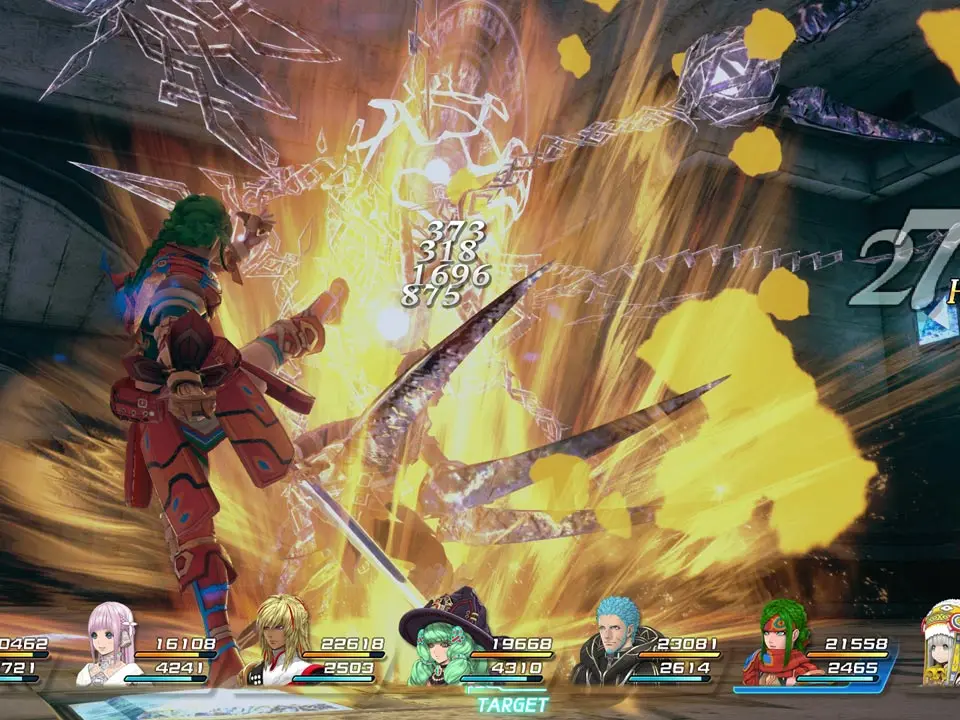
To initiate a Reserve Rush, you must first have at least one segment of your Reserve Gauge filled. The Reserve Gauge is located in the top-left corner of your screen during combat, represented by a series of blue bars. As you perform actions like attacking, guarding, and successfully canceling attacks, this gauge will fill up.
- Ensure Reserve Gauge is Charged: Confirm you have at least one blue bar filled in your Reserve Gauge.
- Hold R2: During battle, hold down the R2 button (PlayStation) or RT button (Xbox). This will bring up the Reserve Rush selection interface.
- Press Circle: While still holding R2, press the Circle button (PlayStation) or B button (Xbox) to activate the Reserve Rush of the currently selected character.
The character whose Reserve Rush will be activated is indicated by a special icon next to their portrait in the selection interface. Upon activation, the character will perform their unique, high-damage Reserve Rush ability.
Selecting a Character for Reserve Rush
You aren't limited to using the Reserve Rush of your currently controlled character. You can choose which party member unleashes their special attack:
- Hold R2: Hold down the R2/RT button to bring up the Reserve Rush selection.
- Cycle with Directional Keys: While holding R2/RT, use the Left or Right directional keys on your D-pad to cycle through your available party members. The character with the active Reserve Rush icon will change as you cycle.
- Activate: Once the desired character is selected, press Circle/B to activate their Reserve Rush.
Pro Tip: You can perform this character selection process even when the battle is paused by accessing the main menu (Triangle/Y). This allows for strategic planning without the pressure of real-time combat.
Controlling Reserve Gauge Consumption
Reserve Rushes typically consume all available segments of your Reserve Gauge for maximum effect. However, you can choose to use fewer segments if you wish to conserve some for later or for multiple, weaker rushes:
- Hold R2: Hold down the R2/RT button to bring up the Reserve Rush selection.
- Press L2: While still holding R2/RT, press the L2 button (PlayStation) or LT button (Xbox). This will cycle through the available Reserve Gauge consumption options (e.g., 1 bar, 2 bars, all bars).
- Activate: Once your desired consumption level is set, press Circle/B to activate the Reserve Rush.
Important Note: The game defaults to consuming the full Reserve Gauge upon loading a save file. If you prefer to use fewer segments, you will need to re-adjust this setting at the start of each play session or after loading a game.
Strategic Use of Reserve Rush
- Burst Damage: Reserve Rushes are excellent for delivering a massive burst of damage to a single target or clearing out groups of weaker enemies. Time them to coincide with enemy weaknesses or when a boss is staggered.
- I-frames: Many Reserve Rushes grant temporary invincibility frames (I-frames) to the executing character, making them useful for dodging otherwise unavoidable attacks.
- Finishing Blows: Use a well-timed Reserve Rush to finish off a tough enemy and prevent them from retaliating.
- Resource Management: While tempting to always use a full gauge, consider using fewer bars if you anticipate needing multiple smaller bursts of damage or if you want to save some gauge for a critical moment later in a long fight.
Unlocking Reserve Rush and Item Creation
While Reserve Rush is a core combat mechanic, the ability to create items, which often synergizes with combat effectiveness, is tied to a specific questline. To unlock Item Creation (IC) and further enhance your combat capabilities, follow these steps:
- Progress the Story: Continue through the main story until you reach the town of Myiddok.
- Locate Welch Vineyard: In Myiddok, find Welch Vineyard's lab. Her lab is conveniently located directly opposite the weapon shop in town.
- Complete Welch's Quests: Engage with Welch and complete her series of quests. These quests typically involve gathering specific items or performing simple tasks.
- Learn the Party Skill: After successfully completing Welch's initial quests, you will unlock the ability to learn the Item Creation party skill. Access the main menu, navigate to the "Skills" section, and select the last option to learn this crucial ability.
- Access Item Creation: Once the party skill is learned, you can access the Item Creation menu from the main menu under the "Creation" tab. This will allow you to synthesize powerful items, equipment, and consumables that can significantly boost your party's performance, indirectly enhancing your Reserve Rush potential through better stats and utility.
By effectively utilizing Reserve Rushes and leveraging Item Creation, you'll be well-equipped to face any challenge Star Ocean: Integrity and Faithlessness throws your way!
100% Human-Written. AI Fact-Checked. Community Verified. Learn how AntMag verifies content