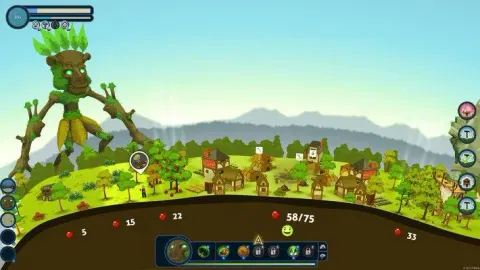
Learn how to control the mighty giants and shape the world in Reus. Master camera controls, giant selection, and ability hotkeys to guide humanity.
Alright, let's get you up to speed on how to actually *play* Reus. It's all about commanding those massive giants and shaping the world, but you need to know the buttons to make it happen! Think of this as your quick-start guide to wielding god-like power.
First off, let's cover the general controls. You'll be using your mouse a lot:
| Mouse - Left Click | This is your go-to for selecting things. Tap it to pick abilities or giants from the HUD, choose tiles to get a closer look, or to actually 'place' powers onto those tiles. If you want to move the camera around the map, just hold down the left mouse button and drag. |
| Mouse - Right Click | Simple: this is how you tell your currently selected giant to move to a specific spot on the map. Point and click where you want them to go. |
| Ctrl | Tap this key to cycle through the different information overlays on the tiles. It helps you see what resources or potential everything has. |
| Space Bar | This pauses the game. Now, the world freezes, but you can still pan around and even issue commands. They'll all happen the second you un-pause, which is super handy for planning your next move without time pressure. |
| Arrow Keys Left and Right | Use these to pan your camera left and right across the world. Essential for getting the lay of the land. |
| Arrow Keys Up and Down | These control your camera zoom. Zoom in to see the details or zoom out to get a better overview of your domain. |
Now, for the really important stuff – the hotkeys that let you quickly switch between giants and use their powers. You don't want to be fumbling around when a crisis hits!
| 1 | Select the Ocean Giant. |
| 2 | Select the Forest Giant. |
| 3 | Select the Rock Giant. |
| 4 | Select the Swamp Giant. |
| Q | Use the Giant's First Ability (often Terraform). |
| W | Use the Giant's Second Ability. |
| E | Use the Giant's Third Ability. |
| R | Use the Giant's Fourth Ability. |
| S | Use the Giant's Fifth Ability. |
| D | Use the Giant's Sixth Ability. |
| F | Use the Giant's Seventh Ability. |
Mastering these controls is key to efficiently managing your giants and their powers. Get comfortable with them, and you'll be shaping worlds like a pro in no time!
100% Human-Written. AI Fact-Checked. Community Verified. Learn how AntMag verifies content