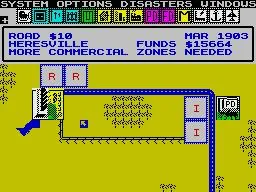
Understand the SimCity HUD: learn about city name, population, time, alerts, budget, and building menu selection.
The SimCity HUD (Heads-Up Display) is located at the top of your screen, above and to the right of the Options Menu (a menu that provides various game options). It is divided into four lines that convey your city’s main information.
City Name: Found in the top left corner of the first line, your city's name defaults to SimCity. In scenarios, San Francisco is shown as 'Cisco' and Rio de Janeiro as 'Rio' to fit the 10-character limit.
Population Counter: Positioned on the first line to the right of the city name, this shows a human figure followed by the total number of citizens. It has six digits, with a maximum display of 999999. (This needs to be checked on the NES version.)
Time: The final section of the HUD’s first line displays the current date, shown as the year followed by the month.
Alerts: These messages scroll across the screen just above the Options menu on the second line of the HUD, informing you of events crucial for your city's progression. The maximum character limit for alerts appears to be 24, based on Debug Mode messages.
- More (Residential/Commercial/Industrial) Zones Needed: Typically appears early in the game due to zoning imbalances, or after rezoning for maximum population.
- Build More Roads: Common when starting out and zones lack access. This alert persists throughout the game if you use an all-Rail layout.
- Inadequate Transit System: Indicates insufficient Rail tiles. Bulldoze traffic areas and replace them with Rail.
- Build a Power Plant: Triggers when zone construction exceeds your power plant capacity. Build more power plants to meet demand. This alert can also appear when your city becomes a Metropolis (causing brownouts regardless of power plant count) or sometimes in January after returning from the Budget screen (likely a bug, can be ignored).
- Citizens Demand a Fire Station: Appears after reaching a population of 2000 and being recognized as a Town by Dr. Wright. Building a Fire Station resolves this. It does not appear if a Fire Station is already built.
- Citizens Demand a Stadium: Appears after reaching a population of 10000 and being recognized as a City by Dr. Wright. Building a Stadium resolves this. It does not appear if a Stadium is already built.
- I AM GODI WISH YOU HAPPY: Displays when Debug Mode is toggled ON.
- I AM GOD DEBUGOFF: Displays when Debug Mode is toggled OFF.
Budget: Located on the third line of the HUD, your available funds are shown with a cash sign ($) followed by the total amount. It appears to have a six-digit limit ($999,999), though it's possible it can display a billion. (This needs to be confirmed.)
Building Menu Selection: Occupying the third and fourth lines, this section shows your chosen building from the Building Menu. The icon for your selection (a person in front of a building) is to the left of your budget on the third line. Below this, on the fourth line, the name and price of your selected building are displayed.
100% Human-Written. AI Fact-Checked. Community Verified. Learn how AntMag verifies content