Discover secret costume colors, beat up defeated opponents, clear the pause screen, and trigger hidden character poses in Street Fighter III: 3rd Strike. Learn about glitches and the System Direction menu.
This section covers various tricks, glitches, and hidden features in Street Fighter III: 3rd Strike, along with an explanation of the System Direction menu.
Secret Costume Color: Each character has six selectable colors. A seventh, hidden color can be accessed by selecting the character with LP + MK + HP. Gill has two standard colors (Punch buttons) and a monochrome hidden color (Kick buttons).
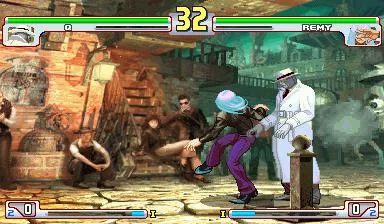
Beat Up Your Defeated Opponent: After a knockout blow, if the opponent was defeated with a Light Punch (LP) or Light Kick (LK), they will be stunned, allowing for further attacks. Other attacks will knock them away, but juggling is still possible.
Clear Pause Screen Trick: Pause the game and press X to make the menu disappear. Any button press other than Start will make the menu reappear.
Effie Losing Pose Trick: Normally, Effie appears and falls next to Necro when he is defeated. If Necro is defeated with an attack that does not knock him down (e.g., LP, LK, Alex's Headbutt), Effie will run up and sit down next to him instead.
Gouki's Shun Goku Satsu Trick: Defeating an opponent with Gouki's Shun Goku Satsu results in a unique, hellish-looking Gouki pose.
Chun-Li's Hidden Win Pose (Arcade Version Only?): Achieve a perfect win. When the "K.O." message appears, press and hold Start to make Chun-Li throw a peace sign.
Hugo's Hidden Taunt (Arcade Version Only?): Hold Start while performing Hugo's Personal Action (HP + HK) to have Poison appear and perform one of three random taunts.
Super Art Naming Glitch (Arcade Version Only): In some early arcade versions, if Yang is selected on the 2P side, his second Super Art is incorrectly listed as "I. Magnetic Storm" instead of "II. Tenshin Senkyuutai." This is purely a naming error.
Graphical Glitches: In the Dreamcast version, a transparent vertical line may appear on characters, showing the background through them.
System Direction Menu
The System Direction menu allows for customization of game rules, such as disabling high jumps, making EX moves free, or changing the Leap Attack command. The menu includes Japanese text for reference, requiring a Japanese word processor like NJSTAR to view.
Basic Instructions
- SYSTEM: NORMAL uses default rules; ORIGINAL applies changes made in System Direction.
- DIRECTION: Accesses the System Direction pages for detailed options.
- SAVE: Saves custom System Direction setups separately from the main save file.
- LOAD: Loads previously saved System Direction configurations.
100% Human-Written. AI Fact-Checked. Community Verified. Learn how AntMag verifies content