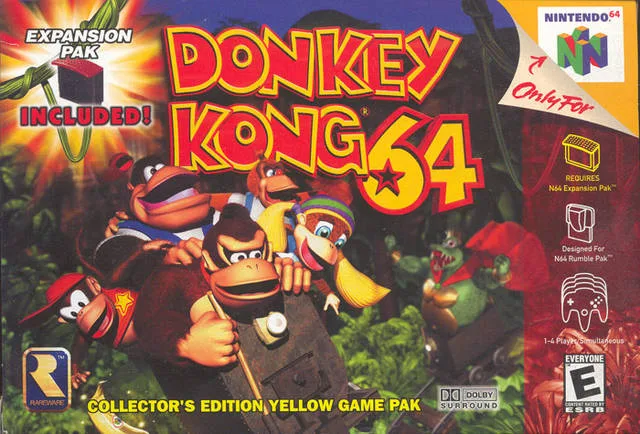
Welcome to Donkey Kong 64, Rare’s massive 1999 Nintendo 64 platformer! You’ll be jumping, barrel-blasting, and swinging your way through five distinct worlds as one of five Kong characters, each with unique abilities. It’s a huge game filled with secrets, and you’ll need to master every obstacle and secret to save the Kongs from King K. Rool’s latest scheme.
This guide is your key to conquering Donkey Kong 64. We’ll help you uncover all the Golden Bananas scattered across the game’s many islands, efficiently collect the hundreds of items each Kong needs, and guide you through challenging boss battles. If you’re aiming to achieve everything the game has to offer, from finding every last collectible to defeating the Kremlings, you’ve come to the right place.
Part 1
Embark on your Donkey Kong 64 adventure with Part 1 of our comprehensive guide, covering the opening sequence and DK Isle.
- 1Opening Sequence: Experience the game's introductory cutscenes detailing the Kremlings' invasion and the Kongs' mission.
- 2DK Isle: This serves as the game's central hub and training area. Familiarize yourself with basic movement, actions, and the general layout.
- 3Jungle Japes: Begin your journey in the first world, Jungle Japes, where you'll learn core gameplay mechanics and start collecting items.
- Pay attention to the introductory cutscenes for story context.
- Spend time in DK Isle to get comfortable with the controls and character abilities before venturing into worlds.
- Explore thoroughly in Jungle Japes to find all the collectibles and secrets.
Part 2
Navigate Part 2 of your Donkey Kong 64 adventure! This guide covers the final boss key, ending sequence, and all the essential appendices like item lists, move lists, and secrets.
Alright, we're diving into Part 2 of our Donkey Kong 64 journey! This section of the guide is all about wrapping things up and exploring the nitty-gritty details of the game. Think of it as the final push to the finish line, plus all the handy reference material you'll need.
Here's a quick rundown of what we'll cover:
- The final boss key and the ultimate showdown.
- The game's grand finale.
- A bunch of useful appendices to help you master every aspect of DK64.
Let's get this done!
Part 3
Dive into Donkey Kong 64 Part 3! Learn the story, master controls like movement and tree climbing, and get ready for your adventure.
Hey there! Welcome to Part 3 of our Donkey Kong 64 guide. This section is all about the Game Basics, covering the game's story and how to get around. It's super helpful, especially if you want to skip some of the early game's tutorials and get straight into the action. We'll cover the essentials so you're ready to tackle those 201 Golden Bananas!
Story:
The story kicks off with some incompetent Klaptraps messing up King K. Rool's new island stronghold, the Blast-o-Matic. It crashes, and K. Rool is furious. His plan to conquer Kong Isle is in jeopardy because his superweapon isn't ready. To make matters worse, his generals, Klump and Krusha, are sent to capture the Kongs and steal their Golden Bananas. K. Rool is faking his distress to trick the Kongs while he gets the Blast-o-Matic fixed to destroy the island. It's a classic K. Rool scheme, setting the stage for your adventure!
Controls:
Control Stick - Movement:
You'll use the control stick to move Donkey Kong in any direction. How far you push it matters:
- Lightly: Donkey will tip-toe. This is super useful for walking across narrow bridges or when you need to be precise.
- Further: Donkey will walk.
- All the way: Donkey will run. Running is usually the fastest way to get around the big worlds, so get used to doing it!
Just be careful – changing direction suddenly while running can make Donkey slide. This can be tricky on narrow ledges, so watch your footing!
Control Stick - Tree Climbing:
To grab onto a tree, just press the [A] button. Once Donkey is holding on, use the control stick to climb up or down. Pushing up makes him climb higher, and pushing down lets him descend. If you climb all the way to the top, Donkey will jump off onto the treetop. Keep in mind that some trees are too thick to climb, but most of them are fair game.
Part 4
Learn how to master Donkey Kong 64's controls in Part 4 of our guide. We cover jumping, swimming, attacking, camera controls, and more!
Alright, let's dive into the nitty-gritty of how to actually *play* Donkey Kong 64. This section is all about getting comfortable with the controls, so you can move, attack, and explore like a pro. Think of this as your personal crash course!
Movement and Basic Actions
You'll be using the control stick for most of your movement on land. It's pretty standard for N64 games, letting you walk and run around. You can also hang onto ledges, which is super useful if you accidentally slip off. If you find yourself hanging, just push the control stick up to climb back up. If you want to drop off intentionally, hold the control stick down and press the Z button.
Swimming underwater works similarly with the control stick, but it's a bit trickier to be precise. Pushing the stick up makes Donkey go down in the water, and holding it down makes him go up. It takes a little getting used to!
The A Button: Jump and Swim
The A button is your go-to for jumping. A quick tap makes you hop a little, pressing it a bit longer gives you a higher jump, and holding it down lets you leap to your maximum height. It's your basic jump mechanic, essential for platforming.
When you're underwater, holding down the A button makes Donkey swim using his whole body. It's the fastest way to get around in the water, but if you're trying to grab specific items, you might want to use a slower method for better accuracy.
The B Button: Attack and Swim
The B button is your offensive tool and also plays a role in swimming. While standing still, pressing B performs a stationary swipe attack. Keep mashing it, and your Kong will string together a few attacks. However, this move limits your movement, so it's usually better to attack while on the move.
When you're moving and press B, your Kong will charge forward, damaging enemies. This is generally the best way to take out baddies because you can keep your momentum going. While underwater, holding the B button makes your Kong paddle his feet. This is a slow, deliberate swim, perfect for when you need to carefully grab items, but not ideal for covering distance.
The Z Button: Dive, Break, and Crouch
In the water, pressing the Z button makes Donkey dive. If you're swimming and hold Z, your Kong will stay still in the water, which can be really handy. On land, holding Z makes DK crouch. This is mainly used to set up other moves, which we'll get to later.
The C Buttons: Camera Control
The C buttons are all about managing your camera. While camera controls can sometimes be frustrating in games, Donkey Kong 64's system is pretty decent. The left C button rotates the camera to the left, and holding it will keep it spinning. The right C button does the same but to the right.
Pressing the up C button switches to a first-person
Similar guides you might like



100% Human-Written. AI Fact-Checked. Community Verified. Learn how AntMag verifies content