Advance your character in PC Building Simulator 2 by improving efficiency and accessing advanced tools. Earn reputation to become a tech titan.
Welcome, aspiring PC building mogul! In PC Building Simulator 2, your journey from a humble repair shop owner to a tech titan is deeply intertwined with your character's progression and the skills you acquire. Unlike traditional RPGs with skill trees, your "skills" here are represented by your efficiency, access to advanced tools, and reputation, all earned through hands-on experience and smart business decisions.
Gaining Experience & Leveling Up
Every completed job contributes to your overall experience points (XP). The more complex the job, the more XP you'll earn. Early on, focus on completing as many jobs as possible to quickly gain levels. Higher levels unlock crucial aspects of the game:
- New Tools: Essential for tackling more advanced repairs and builds.
- Shop Upgrades: Expand your workspace, allowing for more concurrent projects and better organization.
- Advanced Components: Gain access to a wider array of CPUs, GPUs, motherboards, and other parts from the in-game shop, enabling you to meet the demands of high-end clients.
- Client Reputation: Higher levels often lead to more discerning, and often more lucrative, clients.
Key Progression Milestones & Unlocks
While there isn't a direct "skill point" allocation system, certain levels unlock significant capabilities that function as your character's skill development. Here's a breakdown of what to prioritize and expect:
Early Game (Levels 1-5): The Apprentice Phase
Your primary goal here is to learn the ropes and build a solid foundation. Focus on:
- Basic Repairs: Many early jobs involve simple diagnostics and part replacements. Master these to earn consistent income and XP.
- Cable Management (Level 2 Unlock): This seemingly minor skill is crucial for client satisfaction and bonus payouts. Practice routing cables neatly, even on basic builds.
- Dust Cleaning Tool (Level 3 Unlock): Essential for "Clean PC" jobs and improving the performance of older systems. Always use this before returning a PC.
- Thermal Paste Application (Level 4 Unlock): Proper CPU installation requires thermal paste. Learn to apply it efficiently to avoid overheating issues and client complaints.
- OS Installation (Level 5 Unlock): A fundamental skill for any PC builder. You'll gain access to the OS installation USB drive. Practice installing "Will OS" quickly and efficiently.
Mid Game (Levels 6-15): The Journeyman Builder
This phase sees you tackling more complex builds and expanding your workshop. Look out for:
- Advanced Diagnostics Software (Level 7 Unlock): Tools like "3DMark" and "OCCT" become available, allowing you to pinpoint performance issues and stress-test components. These are vital for "Diagnose & Fix" jobs.
- Overclocking Tools (Level 10 Unlock): Clients will start requesting overclocked systems. This skill requires careful balancing of voltage, clock speeds, and cooling. Experiment with different CPUs and GPUs on your test bench before attempting client builds.
- Custom Water Cooling (Level 12 Unlock): A significant leap in complexity and profitability. Unlocks custom water cooling parts and the "Water Cooling Kit." This requires precise tube bending and component placement. Start with simple loops before moving to intricate designs.
- Shop Expansion (Various Levels): Keep an eye on the "Shop" tab in your tablet. Expanding your workshop allows for more workbenches, storage, and eventually, dedicated areas for water cooling and painting.
Late Game (Levels 16+): The Master Craftsman
At these higher levels, you're a seasoned professional. Focus on maximizing profits and taking on the most challenging contracts:
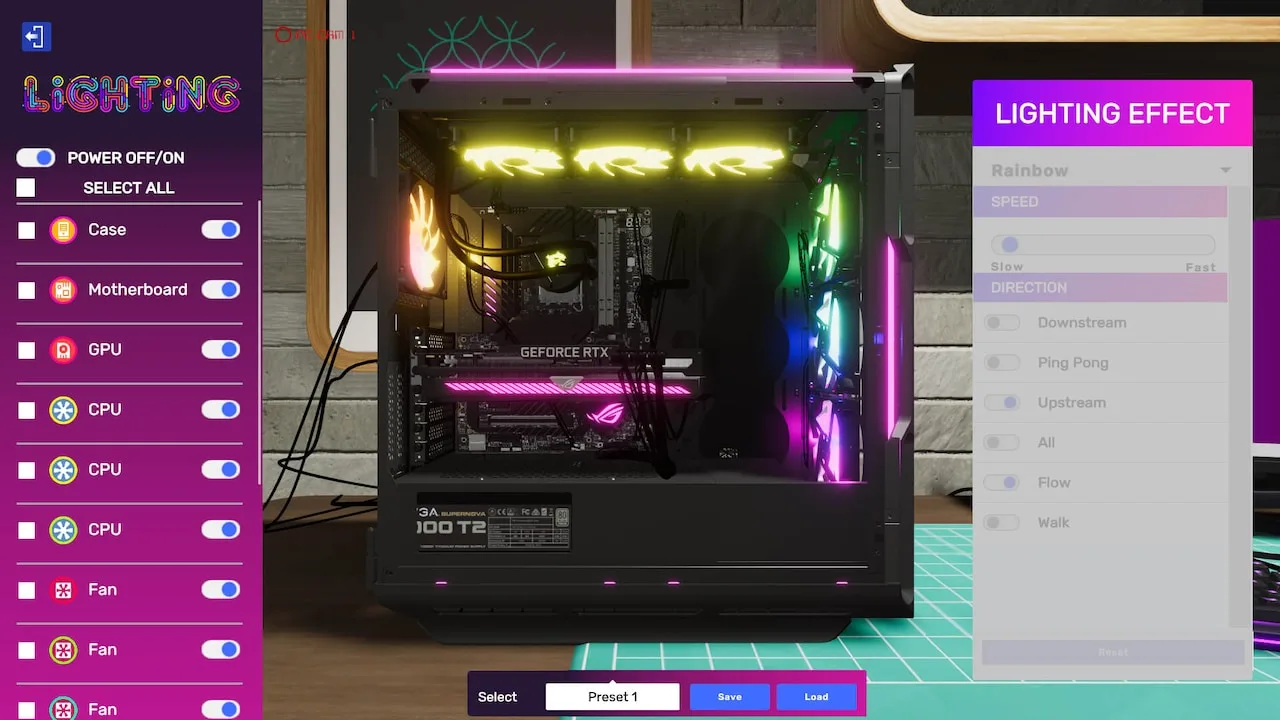
- RGB Customization (Level 16 Unlock): High-end clients often demand aesthetically pleasing builds. Master the "RGB Control Software" to synchronize lighting across various components.
- Modding & Painting (Level 18 Unlock): Unlocks the "Paint Booth" and various modding tools. This allows for unique, personalized builds that command premium prices. Experiment with color schemes and custom designs.
- Specialized Contracts: Expect to see more unique and demanding jobs, such as building extreme gaming rigs, custom server setups, or silent workstations. These often require a deep understanding of component synergy and advanced cooling solutions.
- Reputation Management: By this stage, your reputation is paramount. Consistently delivering high-quality work, meeting deadlines, and exceeding client expectations will unlock the most prestigious and profitable contracts.
Strategy for Efficient Progression
- Always Check Objectives: Before starting any job, thoroughly read the client's email. Missing a small detail can lead to a failed job and lost XP/income.
- use the Tablet: Your in-game tablet is your best friend. Use it to order parts, check emails, track objectives, and access your shop upgrades.
- Don't Be Afraid to Experiment: The free build mode is excellent for practicing new techniques like water cooling or overclocking without risking client parts.
- Invest in Tools Early: As soon as new tools are unlocked, purchase them. They will significantly speed up your work and open up new job types.
- Manage Your Finances: While XP is important, always ensure you have enough capital to purchase necessary parts and tools. Don't overspend on unnecessary upgrades too early.
- Read the Wiki/Guides: If you're stuck on a particular job or concept, don't hesitate to consult in-game help or external resources.
By diligently following these steps and continuously honing your building prowess, you'll quickly progress through the ranks, unlocking new opportunities and cementing your status as the premier PC builder in the game!
100% Human-Written. AI Fact-Checked. Community Verified. Learn how AntMag verifies content