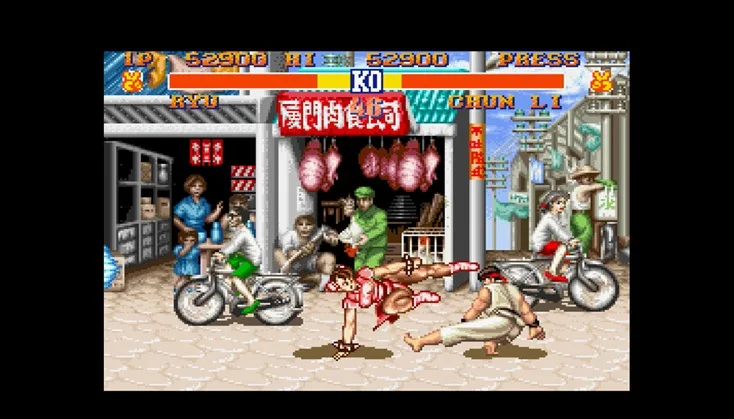
Welcome to the ultimate arcade fighting experience with Street Fighter II! This legendary title from Capcom throws you into intense one-on-one battles where mastering your chosen fighter's unique moves and combos is key to victory. Whether you're playing as the powerful Balrog or the iconic Ryu, you'll need to learn precise timing, execute special attacks, and even utilize environmental interactions to overcome your opponents across diverse global locations.
This guide is your go-to resource for conquering every aspect of Street Fighter II. We'll delve into beginner tips, character-specific strategies, and advanced techniques to help you master the game. Get ready to learn everything from basic move lists to advanced strategies, ensuring you can overcome any challenge and claim the title of world warrior.
. Introduction
Jump into Street Fighter II with confidence! This guide helps beginners master moves, understand characters, and navigate the classic arcade fighter without the frustrating learning curve.
Hey there! So you've picked up Street Fighter II and are ready to throw down, but maybe you're new to the series or just don't have the manual? No worries, this guide is here to get you up to speed. We're not going to dive into super-technical stuff like damage stats or character endings; the goal here is to help you get comfortable playing your favorite characters and pull off their moves without all the guesswork.
Even though it's an older game, Street Fighter II has a surprising amount of depth in its normal attacks, letting you get really creative. It's basically the game that kicked off the whole fighting genre, and it's still super respected. CAPCOM did a fantastic job bringing that arcade feel to the SNES and SEGA Genesis back in the day, and even if they were 'watered-down' ports, they were a blast!
This guide will cover the move-lists and other key topics to get you playing, but we'll steer clear of advanced techniques like juggling or ticking – that's for the hardcore players. If you're already a Street Fighter pro, you'll probably want to check out the more in-depth guides on the site for those super-advanced strategies.
A Note for Older Versions:
This guide mainly focuses on Super Street Fighter II, but it will point out what's relevant if you're playing older versions like Turbo Hyper Fighting or World Warrior. If you're playing one of those, you might see mentions of new content not in your version. Don't sweat it, though! Anything that's not in your game will be clearly marked, so you can easily find the info you need.
To help you out, especially with the move-lists, here's a little key. It's a good idea to keep this handy:
- / : This character is new to Super Street Fighter II: The New Challengers.
- : This character was already available in Street Fighter II: Turbo.
- / : This character was already available in the earliest version of the game.
- *--: This move was first seen in Street Fighter II: World Warrior.
- **-: This move was first seen in Street Fighter II: Turbo Hyper Fighting.
- ***: This move was totally new to Super Street Fighter II!
Heads Up: You won't need this key if you're playing Super Street Fighter II! It's only for the older editions. Lots of moves were added in the last version, especially attacks done on contact, but most special attacks and grabs are pretty consistent across all three.
. Basic Controls
Learn the basic controls for Street Fighter II, including its three-button system for punches and kicks.
Street Fighter II games utilize three buttons for both kicking and punching. Unlike some other arcade fighters, there are no triggers directly assigned to grabbing, running, or blocking. Some combos require you to be touching the opponent to function correctly. This control scheme may require an adjustment period if you are accustomed to games like Mortal Kombat.
- Be aware that certain combos only work when you are in direct contact with your opponent.
- If you are used to games with dedicated blocking or grabbing buttons, you will need to adapt to Street Fighter II's system.
- Controls assume you are facing the correct direction.
controls in the move-list are reversed when facing left!
Master Street Fighter II controls: learn movement, punches, kicks, and special moves. Note controls are reversed when facing left!
Movement:
- Left: Step Back. Your character will automatically block (preventing damage from opponent attacks) while holding Left.
- Right: Move Right. Holding the middle punch button while holding Right in front of an opponent allows you to grab them. This also works mid-air under specific conditions.
- Up: Jump upwards. Pressing Right or Left while jumping causes your character to flip forward or backward, respectively.
- Down: Crouch. Blocking is still possible while in this position.
Punches:
- Low Punch: A swift but weak punch.
- Middle Punch: A stronger punch than Low Punch.
- High Punch: The strongest but slowest punch, aimed at the face or collar.
Kicks:
- Low Kick: A fast but weak kick targeting the opponent's gut.
- Middle Kick: Lifts higher than Low Kick and deals more damage.
- High Kick: A slow but heavy kick attack, occasionally aimed at the head.
Other:
- Pause: Freezes the game until pressed again. It has no other function.
- Remember that all directional inputs for moves are reversed when your character is facing left.
- Grabs can be performed by holding the middle punch button and Right when close to an opponent.
- Blocking is an essential defensive maneuver available while standing or crouching.
. Guide-Related Notes
Master Street Fighter II! Learn how to quickly find character moves, understand combo syntax, and use control maps for SNES & Genesis. Your guide to SFII mastery.
Hey there! So you're diving into Street Fighter II and want to get a handle on all those moves? This guide section is gonna be your best friend for that. It's packed with info, but don't sweat it – I've got some tips to make finding what you need super easy.
First off, this guide has a TON of moves listed. To save yourself some serious time, use your browser's 'Find' tool (usually Ctrl + F on your keyboard). Just type in the character's name, and boom, you're there. To make it even easier, I've added little 'search tags' right under each character's name. So even if you misspell something slightly, you should still be able to find them without pulling your hair out.
I've also set up the combos list so you can just glance over it. No need to stare at it for ages trying to find that one specific combo. Plus, to make sure nobody's confused, I've included control maps for both the Sega Genesis and the Super Nintendo versions. This way, you won't have to try and memorize weird acronyms like 'HK' or 'LP' – just tell me what buttons to press, right? That's why I'm not keeping separate guides for each system; it's all right here.
There's one little piece of syntax I used, but honestly, it's totally optional. You can just skip right over it if you want. It's the asterisk system:
- *****: This shows you how fast a character moves and how high they jump. It goes from one star (*) for the slowest characters with the lowest jumps, all the way up to five stars (*****) for the fastest characters with the highest jumps.
So yeah, use the Find tool, check out the search tags, and don't worry about those asterisks unless you want to know about speed and jump height. Happy fighting!
Similar guides you might like




100% Human-Written. AI Fact-Checked. Community Verified. Learn how AntMag verifies content